
Stop less. Do more.
Hold a key and speak - Wordiv writes, translates and rewrites right inside the app you're already in.Hold a key and speak - Wordiv writes it in any app.
Beta · Windows 10/11 · Limited beta places · 30 days of full access, then the Free planBeta · Windows 10/11 · Limited beta places · 30 days of full access, then the Free planWhat was said - top. What lands in your document - bottom.
You already know what you want to do. The friction is everything that happens in between.
Wordiv is built to shorten the distance between "I know what I want" and "it is already on the screen."
Without Wordiv
With Wordiv
This is what working with Wordiv looks like
A tour of every capability, one after another, on a real screen - dictation, translation, rewriting, working with your screen and files, media transcription and prompt building. 15 minutes. Narrated in Hebrew.
Seven moments that make the product click.
Say it. It is written.
Hold a shortcut, speak, release.
Wordiv cleans up filler words and repetitions, handles self-corrections, fixes language issues and places the result directly where your cursor is.
Not a raw transcript you have to clean up afterward.
Text that gets you closer to simply continuing the work.
What was said — top. What lands in your document — bottom.
Speak in one language. Get it in another.
The email has to go out in Spanish, but it is easier to explain it in English?
Speak in the language that comes naturally, and get the email in the other one - inside the app you were already using.
No drafting twice. No separate translator. No manual trip back to the original app.
Spoken in English, hesitations included · lands in Spanish, clean
The quality of the answer starts with the quality of the prompt.
Most prompts are written the way they come to mind: one generic line.
Press F4 and Wordiv upgrades it into a detailed, precise prompt — goal, context, audience and structure — ready for any AI model.
Same question. A different level of answer.
Works on prompts you dictate, type or select — in any app
Do not move the work to AI. Bring AI to the work.
Most of the time, the problem is not that you do not have AI.
The problem is that the context is in one place and the AI is somewhere else.
Wordiv closes that gap.
Select text, part of your screen, a file or a folder and ask by voice. Wordiv uses what you selected as context and returns an answer without making you rebuild the story in another window.
Spend less time explaining the context. Spend more time using the answer.
Working in Codex, Cursor or Claude Code?
Describe what you want the agent to do, even if you do not know the technical terms.
Wordiv turns the explanation into a structured English prompt, shows it for editing before sending and pastes it directly into the prompt window.
No technical vocabulary needed · editable before it lands · Enter pastes it into the editor
Drop the recording. Ask the question.
Add audio or video to the Media window.
Wordiv transcribes it, separates speakers, summarizes it and lets you ask questions about the content.
"What did we agree on?"
"Who mentioned the budget?"
"Translate this part."
The recording stops being something you have to scrub through. It becomes something you can work with.
Wrote something? Improve it. Haven’t yet? Have it written.
Select text you wrote — an email, a message, a post — and it comes back polished in the style you pick: professional, friendly, humorous, WhatsApp, email and more. Or switch to the writing assistant, describe what you need — and it writes it for you.
Wordiv can even learn your voice: give it a few things you already wrote, and it saves them as a personal style you can pick like any other.
Nine built-in styles plus up to six personal styles of your own — one click.
Select or dictate text anywhere · rewrite & writing assistant — nine built-in styles + six personal ones, one click
Wordiv works in 38 languages, including English, Hebrew, Arabic and Russian. See all languages →
Start with the part of your workday that wastes the most time.
Maybe it is email. Maybe translation. Maybe AI prompts. Maybe recordings you never want to replay from the beginning.
Wordiv does not need to change your entire workflow on day one.
It only needs to remove a few interruptions you have already learned to tolerate.
Fill in a short form and get a download link by email right away.
Initial beta launch in Israel · Sign in with Google, no keys · beta testers get 30 days of full access, then the Free plan · Windows 10/11 · Limited spotsThe beta account lets you try everything Wordiv can do. Some of it will not be part of the Free plan, and will stay in the paid plans.
Quick answers
Is it really free?+
Yes. Every beta tester (places are limited) gets 30 days of full beta - a chance to try everything Wordiv can do. After that the account moves automatically to the Free plan, with no lockout and no credit card. Some features, such as speaker separation, questions about YouTube videos and personal writing styles, are included only in the paid plans. What each plan includes
Windows shows a blue screen - is it safe?+
Yes. It does not mean anything is wrong with the software.
Windows shows that screen for any new program that not enough people have downloaded yet, and it disappears on its own as more people install. Wordiv is digitally signed with an official certificate in the name of Shachar Perlman, and you can see the name on that screen.
Click More info, then Run anyway, and the installation carries on as usual.
Does it work in my language?+
Wordiv works in 38 languages, and you can speak in one and get the text in another - for example, speak English and get Spanish. The full list is on the product page.
פחות לעצור. יותר לעשות.
מחזיקים מקש ומדברים - Wordiv כותבת, מתרגמת ומשכתבת ישירות בתוכנה שבה אתם עובדים.מחזיקים מקש ומדברים - Wordiv כותבת בכל תוכנה.
בטא · Windows 10/11 · מקומות בבטא מוגבלים · 30 יום של גישה מלאה, ואז מסלול חינמיבטא · Windows 10/11 · מקומות בבטא מוגבלים · 30 יום של גישה מלאה, ואז מסלול חינמימה שנאמר - למעלה. מה שנכנס למסמך - למטה.
אתם כבר יודעים מה אתם רוצים לעשות. הבעיה היא כל מה שצריך לעשות בדרך.
Wordiv נועדה לקצר את הדרך בין "יש לי מחשבה" לבין "זה כבר מוכן על המסך".
בלי Wordiv
עם Wordiv
ככה זה נראה כשעובדים עם Wordiv
סקירה של כל היכולות אחת אחרי השנייה, על מסך אמיתי - הכתבה, תרגום, שכתוב, עבודה עם מסך וקבצים, תמלול מדיה ויצירת פרומפטים. 15 דקות.
שבעה רגעים שבהם מרגישים למה Wordiv קיימת.
אמרתם. זה כתוב.
מחזיקים קיצור מקשים, מדברים ומשחררים.
Wordiv מנקה מילות מילוי וחזרות, מבינה תיקונים עצמיים, מתקנת את הטקסט ומכניסה את התוצאה ישירות במקום שבו נמצא הסמן.
לא תמלול גולמי שצריך לסדר אחר כך.
טקסט שמגיע קרוב יותר למצב שבו אפשר פשוט להמשיך לעבוד.
מה שנאמר - למעלה. מה שנכנס למסמך - למטה.
מדברים בעברית, מקבלים באנגלית.
המייל צריך לצאת באנגלית, אבל יותר טבעי לכם להסביר בעברית?
מדברים בשפה שנוחה לכם ומקבלים את המייל באנגלית - בתוך התוכנה שכבר פתוחה. וזה עובד גם הפוך.
בלי לנסח פעמיים. בלי לעבור למתרגם. בלי להחזיר את הטקסט ידנית.
דיברתם בעברית, עם היסוסים · נכנס באנגלית, נקי
איכות התשובה מתחילה באיכות הפרומפט.
רוב הפרומפטים נכתבים כמו שהם יוצאים בראש: שורה אחת כללית.
לוחצים F4 ו-Wordiv משדרגת אותם לפרומפט מפורט ומדויק - מטרה, הקשר, קהל יעד ומבנה - מוכן לכל מודל שפה.
אותה שאלה. תשובה ברמה אחרת לגמרי.
עובד על פרומפטים שמכתיבים, מקלידים או מסמנים - בכל אפליקציה
אל תעבירו את העבודה ל-AI. תביאו את ה-AI לעבודה.
רוב הזמן, הבעיה היא לא שאין לכם AI.
הבעיה היא שההקשר נמצא במקום אחד וה-AI במקום אחר.
Wordiv מצמצמת את הפער הזה.
בחרו טקסט, אזור במסך, קובץ או תיקייה ושאלו בקול. Wordiv משתמשת במה שבחרתם כהקשר ומחזירה תשובה בלי שתצטרכו לבנות את הסיפור מחדש בחלון אחר.
פחות זמן להסביר מה אתם רואים. יותר זמן להשתמש בתשובה.
עובדים עם Codex, Cursor או Claude Code?
תארו בקול מה אתם רוצים שהסוכן יעשה, גם אם אתם לא מכירים את המושגים הטכניים.
Wordiv הופכת את ההסבר לפרומפט מסודר באנגלית, מציגה אותו לעריכה לפני שליחה ומדביקה אותו ישירות בחלון הפרומפטים.
בלי מונחים טכניים · אפשר לערוך לפני · Enter מדביק ישירות לחלון הפרומפטים
הקלטה ארוכה. במקום לחפש בה - שואלים אותה.
גוררים אודיו או וידאו בכל פורמט לחלון המדיה.
Wordiv מתמללת, מפרידה בין דוברים, מסכמת ומאפשרת לכם לשאול שאלות על התוכן.
"מה סוכם?"
"מי דיבר על התקציב?"
"תרגם את החלק הזה."
ההקלטה מפסיקה להיות משהו שצריך לעבור עליו. היא הופכת למשהו שאפשר לעבוד איתו.
כתבתם משהו? שפרו אותו. עוד לא? תנו לו להיכתב בשבילכם.
מסמנים טקסט שכתבתם - מייל, הודעה, פוסט - והוא חוזר מלוטש בסגנון שבחרתם: מקצועי, ידידותי, הומוריסטי, וואטסאפ, אימייל ועוד. או שעוברים לעוזר הכתיבה, מתארים מה צריך להיכתב - והטקסט נכתב עבורכם.
Wordiv יכולה ללמוד גם את הקול שלכם: נותנים לה כמה דברים שכבר כתבתם, והיא שומרת אותם כסגנון אישי שבוחרים כמו כל סגנון אחר.
תשעה סגנונות מובנים ועד שישה סגנונות אישיים משלכם - בקליק אחד.
מסמנים או מכתיבים טקסט בכל מקום · שיפור ניסוח ועוזר כתיבה - תשעה סגנונות מובנים + שישה סגנונות אישיים, בקליק אחד
Wordiv עובדת ב-38 שפות, כולל עברית, ערבית ורוסית. לרשימה המלאה ←
תתחילו מהמקום שמבזבז לכם הכי הרבה זמן.
אולי אלה המיילים. אולי תרגום. אולי פרומפטים ל-AI. אולי הקלטות שאתם אף פעם לא רוצים לשמוע שוב מההתחלה.
Wordiv לא צריכה לשנות את כל יום העבודה שלכם ביום הראשון.
מספיק שהיא תחסוך כמה עצירות שאתם כבר רגילים אליהן.
ממלאים טופס קצר, ומקבלים מיד במייל קישור להורדה.
ההשקה הראשונית מתחילה בישראל · מתחברים עם Google, בלי מפתחות · בודקי בטא מקבלים 30 יום של גישה מלאה, ואז מסלול חינמי · Windows 10/11 · מקומות מוגבליםחשבון הבטא נותן לכם לנסות את כל היכולות של Wordiv. חלק מהן לא יהיו זמינות במסלול החינמי, והן יישארו במסלולים בתשלום.
תשובות מהירות
זה באמת חינם?+
כן. כל בודק בטא (מספר המקומות מוגבל) מקבל 30 יום של בטא מלאה - הזדמנות לנסות את כל היכולות של Wordiv. אחר כך החשבון עובר אוטומטית למסלול החינמי, בלי חסימה ובלי כרטיס אשראי. חלק מהיכולות, כמו הפרדת דוברים, שאלות על סרטוני YouTube וסגנונות כתיבה אישיים, כלולות רק במסלולים בתשלום. מה כולל כל מסלול
Windows מציג מסך כחול - זה בטוח?+
כן. זה לא אומר שמשהו לא תקין בתוכנה.
Windows מציג את המסך הזה לכל תוכנה חדשה שעדיין לא הורידו מספיק אנשים, והוא נעלם מעצמו ככל שיותר אנשים מתקינים. Wordiv חתומה דיגיטלית בתעודה רשמית על שם Shachar Perlman, ואפשר לראות את השם במסך עצמו.
לוחצים על מידע נוסף ואז על הפעל בכל מקרה, וההתקנה ממשיכה כרגיל.
זה עובד טוב בעברית?+
כן. בהכתבה בעברית Wordiv מנקה מילות מילוי ומתקנת דקדוק, כולל התאמה של זכר ונקבה ויחיד ורבים. אפשר לדבר בעברית ולקבל אנגלית, או להפך.
ויש כלים לעבודה עם טקסט מימין לשמאל: תיקון טקסט שהוקלד בשפת מקלדת לא נכונה, היפוך כיוון ותצוגת RTL לקריאה.
Fewer reasons to leave the app you're in.
Wordiv works inside every Windows app and brings the next action to the place where you already are.
Dictate. Translate. Rewrite. Ask about a screen or file. Transcribe a meeting. Build a better prompt.
Not "switch to Wordiv." Keep working, with Wordiv in the flow.
Beta · Windows 10/11 · Limited spotsIf you already know what you want to say, why start with typing?
Hold a shortcut, speak, release.
Wordiv turns natural speech into clean text and places it directly where your cursor is.
Why it matters
You do not have to speak like you write.
You can think out loud and get a cleaner result at the end.
What can happen along the way
- Live transcription while you speak
- Filler-word and repetition cleanup
- Self-correction handling
- Grammar and language cleanup
- Spoken commands such as "new line"
- Recording lock for hands-free dictation
Switch languages without stopping.
Wordiv lets you speak in one language and produce text in another, directly inside the place where you are already working.
Email. Message. Document. Prompt.
You stay in context.
Translate Existing Text
Already wrote something? Select it and translate it.
In Word, Wordiv preserves the original fonts, sizes and styles of the selected text.
Why it matters
Translation should not create another round of copying, pasting and formatting cleanup.
WORD · BEFORE
WORD · AFTER F2 — SAME FONTS, SIZES & STYLES
The text is already there. So is the next action.
Select the text and run the action you need.
Default keys (you can change them in Settings)
| F1 | Fix text typed with the wrong keyboard layout |
| F2 | Translate text while preserving formatting |
| F3 | Correct writing and rephrase it |
| F4 | Improve a prompt for AI models |
| F5 | Extract text from a screen region |
| F6 | Transcribe audio and video files |
| F10 | Flip text between RTL and LTR |
| F11 | RTL reading view |
| F12 | Count words, characters and sentences |
Rewrite
Start with corrections only. If needed, switch the style:
Plus up to six personal styles of your own.
Why it matters
A "small edit" should not become a trip to another tool.
No need to explain to AI what you are looking at - select it, and it sees for itself.
You can select:
- Text
- Part of the screen
- A file
- A folder
Then ask by voice.
Wordiv uses that context to answer, explain, translate or help you continue the task.
Supported file types include:
Without opening every file just to pull out one piece of information.
Continue the Conversation
Wordiv keeps short-term conversation context, so you can continue with:
Without selecting the same content again.
When Current Information Is Needed
Wordiv searches the web when needed.
The idea is already clear. Wordiv writes the prompt.
Describe what you want Cursor, Claude Code or another AI tool to do.
Wordiv turns the explanation into a concise, structured English prompt, shows it for editing and pastes it directly into the editor.
Already have a prompt? Select it and improve it in place.
Why it matters
AI is supposed to shorten the path to the result, not add another writing task before you begin.
Editable before it lands · Enter pastes it into the editor
A long recording? Ask it.
Drop audio, video or images into the Media window.
Why it matters
Once the content becomes text, you can stop searching through it and start asking about it.
Audio and video
- Transcription
- Speaker separation
- Summary
- Chat with the transcript
- Audio extraction from video
- Automatic splitting of long recordings
Images
- Image description
- Text extraction
A photo of a slide. An image with text.
Small tools that save small stops.
Personal Dictionary
Names, professional terms and acronyms the system should recognize and spell correctly.
Text Shortcuts
Type ///mail and expand it into the full text you defined.
Side tab
Mouse access to core functions, from a small tab on the edge of your screen.
History
Your 10 most recent dictations, ready to copy.
RTL/LTR
Tools for fixing directionality and reading mixed-language text.
Quick Counts
Words, characters and sentences in selected text.
One product. 38 languages.
Fewer tools to open. Less text to move. More work that stays in motion.
Beta · Windows 10/11 · Limited spotsפחות סיבות לעזוב את מה שכבר פתוח.
Wordiv עובדת בתוך כל תוכנה ב-Windows ומביאה אליכם את הפעולה הבאה בדיוק במקום שבו אתם כבר נמצאים.
להכתיב. לתרגם. לשכתב. לשאול על מסך או קובץ. לתמלל פגישה. לבנות פרומפט טוב יותר.
לא "לעבור ל-Wordiv". להמשיך לעבוד - עם Wordiv בדרך.
בטא · Windows 10/11 · מקומות מוגבליםאם אתם כבר יודעים מה לומר, למה להתחיל מהקלדה?
מחזיקים קיצור מקשים, מדברים ומשחררים.
Wordiv הופכת דיבור טבעי לטקסט נקי ומכניסה אותו ישירות במקום שבו נמצא הסמן.
למה זה משנה
כי אתם לא צריכים לדבר כמו שאתם כותבים.
אתם יכולים לחשוב בקול, ולקבל טקסט מסודר יותר בסוף.
מה קורה בדרך
- כתובית חיה מציגה את הדיבור
- מילות מילוי וחזרות נמחקות
- תיקנתם את עצמכם באמצע? נשאר רק התיקון
- הטקסט עובר תיקוני דקדוק והתאמות שפה
- פקודות כמו "שורה חדשה" הופכות לפעולה
- אפשר לנעול את ההקלטה ולדבר בלי להחזיק מקש
עוברים שפה בלי לעצור.
Wordiv מאפשרת לדבר בשפה אחת ולקבל טקסט בשפה אחרת - ישירות בתוך המקום שבו אתם עובדים.
מייל. הודעה. מסמך. פרומפט.
אתם נשארים בהקשר.
תרגום של טקסט קיים
כבר כתבתם משהו? סמנו ותרגמו.
וב-Word, Wordiv שומרת על הפונטים, הגדלים והסגנונות המקוריים של הטקסט המסומן.
למה זה משנה
כי תרגום לא צריך לייצר עוד סבב של העתקה, הדבקה ותיקוני פורמט.
WORD · לפני
WORD · אחרי F2 - אותם פונטים, גדלים וסגנונות
הטקסט כבר שם. גם הפעולה הבאה.
בחרו טקסט והפעילו את הפעולה הרצויה.
מקשי ברירת המחדל (אפשר לשנות בהגדרות)
| F1 | תיקון טקסט שהוקלד בפריסת מקלדת לא נכונה |
| F2 | תרגום טקסט עם שמירת עיצוב |
| F3 | תיקון ושיפור כתיבה ושינוי נוסחים |
| F4 | שיפור פרומפט למודלי שפה |
| F5 | חילוץ טקסט מתוך אזור במסך |
| F6 | תמלול של קבצי אודיו ווידאו |
| F10 | היפוך טקסט RTL LTR |
| F11 | תצוגת RTL לקריאה |
| F12 | ספירת מילים, תווים ומשפטים |
שיפור ניסוח
מתחילים בתיקון שגיאות בלבד. אם צריך, עוברים לסגנון:
ועד שישה סגנונות אישיים משלכם.
למה זה משנה
כי "תיקון קטן" לא אמור להפוך למסע לכלי אחר.
לא צריך להסביר ל-AI מה אתם רואים - מסמנים, והוא רואה בעצמו.
אפשר לבחור:
- טקסט
- אזור במסך
- קובץ
- תיקייה
ולשאול בקול.
Wordiv משתמשת בהקשר הזה כדי לענות, להסביר, לתרגם או לעזור לכם להמשיך את המשימה.
קבצים נתמכים כוללים:
בלי לפתוח כל קובץ רק כדי להוציא ממנו שורה אחת.
המשך שיחה
Wordiv שומרת הקשר שיחה קצר, כך שאפשר להמשיך:
בלי לבחור מחדש את אותו תוכן.
כשצריך מידע עדכני
Wordiv מחפשת באינטרנט כשצריך.
הרעיון כבר בראש. Wordiv מנסחת את הפרומפט.
מתארים בקול מה אתם רוצים ש-Cursor, Claude Code או כלי AI אחר יעשה.
Wordiv לוקחת את הבקשה שלכם - גם אם היא לא מנוסחת עם כל המושגים הטכניים והמקצועיים - והופכת אותה לפרומפט מסודר באנגלית שכלי הקוד מבינים הכי טוב, מציגה אותו לעריכה ומדביקה אותו ישירות לעורך.
יש כבר פרומפט? סמנו אותו ושפרו אותו במקום.
למה זה משנה
כי העבודה עם AI אמורה לקצר את הדרך לרעיון - לא להוסיף עוד שלב של ניסוח לפני שמתחילים.
אפשר לערוך לפני · Enter מדביק ישירות לעורך
הקלטה ארוכה? שואלים אותה.
גוררים אודיו, וידאו או תמונות לחלון המדיה.
למה זה משנה
כי אחרי שהתוכן הופך לטקסט, אפשר להפסיק "לחפש בתוכו" ולהתחיל לשאול עליו.
אודיו ווידאו
- תמלול
- הפרדת דוברים
- סיכום
- צ'אט על התמלול
- חילוץ אודיו מווידאו
- פיצול אוטומטי של הקלטות ארוכות
תמונות
- תיאור תמונה
- חילוץ הטקסט שמופיע בה
צילום של שקף. תמונה עם טקסט.
כלים קטנים שחוסכים עצירות קטנות.
מילון אישי
שמות, מונחים מקצועיים וראשי תיבות שהמערכת צריכה לכתוב נכון.
קיצורי טקסט
הקלידו ///mail וקבלו את הטקסט המלא שהגדרתם.
הלשונית הצדדית
גישה לפונקציות המרכזיות עם העכבר, מלשונית קטנה בצד המסך.
היסטוריה
10 ההכתבות האחרונות זמינות להעתקה.
RTL/LTR
כלים לתיקון כיווניות ולקריאה נוחה יותר.
ספירה מהירה
מילים, תווים ומשפטים בטקסט מסומן.
מוצר אחד. 38 שפות.
פחות כלים לפתוח. פחות טקסט להעביר. יותר עבודה שנשארת בתנועה.
בטא · Windows 10/11 · מקומות מוגבליםEverything you wanted to ask
Straight answers about what Wordiv does, your privacy, the beta and everyday use. Search for a word, or jump to a topic.
Getting started
Joining the beta, installing, and what you need.
How do I join the beta?+
Fill in a short form and get a download link by email right away. To the form.
The number of spots is limited.
Do I need an API key?+
No. You sign in with a Google account from inside the app, in one click, and start working - no keys, no setup. If you prefer to use API keys of your own, you can, and it is all explained on the advanced page.
Does Wordiv work on Mac or Linux?+
Not currently.
Wordiv is for Windows 10 and Windows 11.
Want to know when the Mac version is out? Leave your email and we'll let you know.
Windows shows a blue "Windows protected your PC" screen. Is it safe?+
Yes. It does not mean anything is wrong with the software.
Windows shows that screen for any new program that not enough people have downloaded yet, and it disappears on its own as more people install. Wordiv is digitally signed with an official certificate in the name of Shachar Perlman, and you can see the name on that screen.
Click More info, then Run anyway, and the installation carries on as usual.
Does Wordiv require an internet connection?+
Yes.
Transcription and the AI run on the AI providers' servers, not on your computer. Wordiv itself is small and runs locally.
Plans and allowances
What is free, what comes after the beta, and your own API keys.
Is it free? What is the monthly allowance, and what happens when it runs out?+
Every beta tester (places are limited) gets 30 days of full beta - a chance to try everything Wordiv can do. After that the account moves automatically to the Free plan, with no lockout and no credit card. Some features, such as speaker separation, questions about YouTube videos and personal writing styles, are included only in the paid plans. What each plan includes
Every account has a monthly usage allowance, and the account's two computers share it. Settings shows how much of it you have used, as a percentage. Dictation, translation and improving text use very little; transcribing a long recording, speaker separation and questions about videos use more.
When the allowance runs out, the actions that go through the AI stop until the start of the next month, and the app tells you when they come back. The tools that run on your computer itself - fixing the keyboard language, text direction, the RTL view, word count, text shortcuts and history - keep working. And you can always switch to API keys of your own. In rare cases, if the beta program's overall budget for a month runs out, the service may pause for everyone until the start of the next month.
What happens after the beta?+
Prices have not been set yet. When the beta ends there will be several plans: a limited free plan, and paid plans with broader usage. We will let you know in advance, by email and on this site, before anything changes, and everyone will choose the plan that suits them.
Everything you built - settings, dictionary, text shortcuts and personal styles - is saved on your computer and carries on with you.
What is the difference between signing in with Google and using my own API keys?+
Two paths, and you choose. With a Google account everything works in one click - no keys, no accounts with the providers - and we pick the engine for each task. With your own keys your content goes straight to the provider, you pay it for what you use, and every provider and capability is open to you. You can switch between them at any time.
The full comparison and the costs
During the beta you can use your own API keys at no charge. After the beta, using your own API keys will be part of the Lifetime plan: a one-time purchase of the app, and then you work with your own keys with no allowances.
Can I switch to my own API keys later?+
Yes. In Settings, click "I have my own API keys". The computer is disconnected from the account, and you then enter your keys in Settings. During the beta, working with your own keys is free, with an access code we send by email. You can go back to your Google account at any time.
During the beta you can use your own API keys at no charge. After the beta, using your own API keys will be part of the Lifetime plan: a one-time purchase of the app, and then you work with your own keys with no allowances.
Privacy and your account
What happens to your words, and how your Google account is used.
What happens to my recordings and text?+
When you are signed in with Google, what you dictate, select or upload passes through Wordiv's server to the AI provider - Groq or Google - and straight back to you. The server does not store the recording, the text or the answer, and does not write them to a log. What we do keep is numbers only: how many times you used each feature this month, how many seconds of audio, and what it cost - to work out the allowance. Never the content itself.
Wordiv uses Groq and Google on paid accounts, where the providers state that they do not use your content to improve their models. Your last ten dictations are kept only on your own computer, in the history window.
Does Wordiv record or store what I type?+
No.
Wordiv listens to the keyboard only to recognise its own shortcuts and the text shortcuts you defined (like ///mail). It does not store keystrokes, log them or send them anywhere.
The microphone is on only while you record - while you hold a recording shortcut, or have locked it on - never in the background.
What does Wordiv see of my Google account?+
Only your email address and Google's id for your account. Not your name, not your photo, not your emails, files or contacts - the sign-in does not ask for access to any of them.
Can I use it on two computers?+
Yes. The same Google account works on up to two computers, and both share the same monthly allowance. When you sign in on a third computer, the app asks which of the two to remove. You can see the list of computers, and remove one, in Settings.
Why can only one Google account be connected to a computer?+
An important distinction: the same Google account does work on two computers (say, a desktop at home and a laptop), with a shared allowance. What is not possible is the other way round: switching one computer between several Google accounts. That is because every account comes with a free monthly allowance. If a computer could switch accounts, anyone could open account after account and collect allowance after allowance - and the beta would run out quickly for everybody. So a computer stays connected to the first account that signed in on it.
Replaced or sold your computer, or something went wrong? Write to us at info@wordiv.app and we'll sort it out.
How do I delete my account?+
Email info@wordiv.app from the account's address, and we will delete it within 30 days and confirm. To also remove what is stored on your computer, sign out in Settings and uninstall the app.
What Wordiv can do
Apps, languages, translation, files, recordings and video.
Is Wordiv a dictation app?+
Not only.
Dictation is one of the core ways to use Wordiv, but the product also includes translation, rewriting, selected-text actions, OCR, screen and file context, media transcription and AI workflows.
Which apps does Wordiv work with?+
Wordiv works in any text field on Windows, so it is not tied to a specific list of apps.
That covers desktop programs you have installed (Office apps like Word and Outlook, desktop apps like ChatGPT or Claude), your browser (Gmail, Slack, WhatsApp Web, and any website), and coding editors like Cursor.
Do I have to copy and paste results?+
Not for dictation or voice translation: Wordiv puts the text straight where your cursor is.
Other actions, such as a voice-assistant answer, show the result in a window and copy it for you automatically, so all that is left is to paste.
Can I speak one language and get text in another?+
Yes.
Hold Windows+Alt and speak in whichever language is comfortable, and the text goes in in the other language you chose in Settings - speak Hebrew and get English, or the other way round. It works between any two of the 38 languages.
Which languages does Wordiv support?+
Wordiv currently works in 38 languages:
Hebrew, English, Arabic, Russian, French, Spanish, German, Italian, Portuguese, Dutch, Polish, Ukrainian, Romanian, Turkish, Hindi, Chinese, Japanese, Korean, Amharic, Greek, Czech, Slovak, Hungarian, Swedish, Danish, Norwegian, Finnish, Bulgarian, Croatian, Serbian, Slovenian, Catalan, Indonesian, Vietnamese, Thai, Malay, Persian and Tagalog.
Does translation in Word preserve formatting?+
Wordiv includes a selected-text translation workflow for Word that can preserve original fonts, sizes and styles.
Can Wordiv read files and folders without opening them?+
Yes, through the voice assistant.
Hold Windows+Shift for about a second until the assistant window opens, choose Selection mode, select a file or a folder in File Explorer, and ask - out loud or by typing.
It works with PDF, images, text and code files, and Word, Excel, PowerPoint and OpenDocument documents. Selecting a folder sends the list of files in it and the content of the supported ones. Works when you are signed in with Google. With your own keys, it needs a Gemini key.
Can I ask questions about a recording?+
Yes.
After transcription, you can ask questions about the content, get a summary and work with parts of the transcript.
Can Wordiv watch a YouTube video and answer questions about it?+
Yes, and nothing has to be transcribed first.
Wordiv does not just listen to the video - it actually watches it: what is said and what happens on screen. You can ask what a slide says, what a chart shows, or what the speaker is doing.
In the media window there is a link field: paste a link to a YouTube video - up to ten at a time - and ask your question in the box at the bottom. The video itself is what gets watched, so you can ask for a summary, for what was said at a particular point, or for a comparison across several videos at once.
Nothing is downloaded to your computer: the link is handed to Google, which fetches the video itself. Only YouTube links work - a Facebook, X, Vimeo or Zoom page is a page with a video in it rather than a video, and cannot be watched. Works when you are signed in with Google. With your own keys, it needs a Gemini key.
Everyday use
Shortcuts, the quick-access tab, customizing and updates.
How do I trigger Wordiv's functions?+
Two ways, whichever suits you.
Either with keyboard shortcuts — hold or press the matching key combo, no mouse needed. Or through the floating Quick Access tab on the edge of your screen — click it with the mouse and pick the function from the list.
Do I have to hold down the keys for the whole recording?+
No.
By default, recording works by holding the shortcut down (for example Windows+Ctrl) — but if you'd rather not keep your fingers on the keyboard, tap the Space key once during the recording to lock it: the recording keeps going even after you let go of the other keys, and tapping Space again ends it.
The lock key itself can also be changed to any other key, on the shortcut customization page in Settings.
How do I learn how to use each capability?+
You do not need to memorize every keyboard shortcut.
Click the floating Quick Access tab on the edge of your screen, and a panel opens with every Wordiv function. Next to each one is a "?" button that opens a short explanation of how it works and when to use it — without leaving the app or searching through a manual.
The dictation window is too large — can I see it without all the dictated text?+
Yes.
That is already the default: while you dictate, Wordiv shows only a small bar with the logo moving to your voice, without the dictated text.
If you prefer to watch the words appear as you speak, switch off “Minimal recording bar” in Settings → Appearance.
Can I customize Wordiv?+
Yes.
You can customize the keyboard shortcuts for every action, choose the accent color of the interface (12 colors, or any color code of your own), and switch between a dark and a light look.
All of it is in Settings → Appearance, and open windows change as soon as you save.
How does the software update?+
Wordiv checks automatically, about once a day, whether a new version is available, and downloads it in the background without interrupting you.
When it is ready, you get both a Windows notification and an "Update available" option in the tray icon's menu. The installation itself happens automatically — but only once you finish whatever you are in the middle of (a recording, a file transcription, and so on), so an update can never cut off your work.
No question matches“”.
Try a different word, or write to us below.
Didn't find your answer?
Write to us - through the contact page or by email - and we'll get back to you. Or join the beta and see for yourself.
כל מה שרציתם לשאול
תשובות ישירות על מה ש-Wordiv עושה, על הפרטיות שלכם, על הבטא ועל השימוש היומיומי. חפשו מילה, או קפצו לנושא.
איך מתחילים
הצטרפות לבטא, התקנה ומה צריך כדי להתחיל.
איך מצטרפים לבטא?+
ממלאים טופס קצר, ומקבלים מיד במייל קישור להורדה. לטופס.
מספר המקומות מוגבל.
צריך מפתח API?+
לא. מתחברים עם חשבון Google מתוך התוכנה, בלחיצה אחת, ומתחילים לעבוד - בלי מפתחות ובלי הגדרות. מי שמעדיף לעבוד עם מפתחות API משלו יכול, והכל מוסבר בעמוד המתקדם.
האם Wordiv עובדת ב-Mac או Linux?+
לא כרגע.
Wordiv מיועדת ל-Windows 10 ו-Windows 11 בלבד.
רוצים לדעת כשתצא גרסת Mac? השאירו אימייל ונעדכן אתכם.
Windows מציג מסך כחול "Windows הגן על המחשב שלך". זה בטוח?+
כן. זה לא אומר שמשהו לא תקין בתוכנה.
Windows מציג את המסך הזה לכל תוכנה חדשה שעדיין לא הורידו מספיק אנשים, והוא נעלם מעצמו ככל שיותר אנשים מתקינים. Wordiv חתומה דיגיטלית בתעודה רשמית על שם Shachar Perlman, ואפשר לראות את השם במסך עצמו.
לוחצים על מידע נוסף ואז על הפעל בכל מקרה, וההתקנה ממשיכה כרגיל.
האם צריך חיבור לאינטרנט?+
כן.
התמלול והבינה המלאכותית רצים על השרתים של ספקי ה-AI, לא על המחשב שלכם. Wordiv עצמה קטנה ורצה אצלכם.
מסלולים ומכסות
מה חינמי, מה יבוא אחרי הבטא, ומפתחות API משלכם.
זה חינם? מה זו המכסה החודשית, ומה קורה כשהיא נגמרת?+
כל בודק בטא (מספר המקומות מוגבל) מקבל 30 יום של בטא מלאה - הזדמנות לנסות את כל היכולות של Wordiv. אחר כך החשבון עובר אוטומטית למסלול החינמי, בלי חסימה ובלי כרטיס אשראי. חלק מהיכולות, כמו הפרדת דוברים, שאלות על סרטוני YouTube וסגנונות כתיבה אישיים, כלולות רק במסלולים בתשלום. מה כולל כל מסלול
לכל חשבון יש מכסת שימוש חודשית, ושני המחשבים של אותו חשבון חולקים אותה. כמה ממנה נוצל רואים בהגדרות, באחוזים. הכתבה, תרגום ושיפור טקסט צורכים מעט מאוד; תמלול של הקלטה ארוכה, הפרדת דוברים ושאלות על סרטונים צורכים יותר.
כשהמכסה נגמרת, הפעולות שעוברות דרך ה-AI נעצרות עד תחילת החודש הבא, והתוכנה אומרת מתי הן חוזרות. הכלים שרצים על המחשב עצמו - תיקון שפת המקלדת, כיוון טקסט, תצוגת RTL, ספירת מילים, קיצורי הטקסט וההיסטוריה - ממשיכים לעבוד. ואפשר תמיד לעבור למפתחות API משלכם. במקרים חריגים, אם התקציב הכולל של תוכנית הבטא לחודש מסוים נגמר, השירות עשוי לעצור זמנית לכולם עד תחילת החודש הבא.
מה יקרה אחרי הבטא?+
המחירים עוד לא נקבעו. בסיום הבטא יהיו כמה מסלולים: מסלול חינמי מוגבל, ומסלולים בתשלום עם שימוש רחב יותר. נודיע מראש, במייל ובאתר, לפני שמשהו משתנה, וכל אחד יבחר את המסלול שמתאים לו.
כל מה שבניתם - ההגדרות, המילון, קיצורי הטקסט והסגנונות האישיים - נשמר במחשב שלכם וממשיך איתכם.
מה ההבדל בין התחברות עם Google למפתחות API משלי?+
שני מסלולים, ואתם בוחרים. עם חשבון Google הכל עובד בלחיצה אחת, בלי מפתחות ובלי חשבונות אצל ספקים, ואנחנו בוחרים את המנוע לכל משימה. עם מפתחות משלכם התוכן עובר ישירות לספק, משלמים לו לפי השימוש, ופתוחים כל הספקים והיכולות. אפשר לעבור ביניהם בכל רגע.
בתקופת הבטא אפשר לעבוד עם מפתחות API משלכם בלי תשלום. אחרי הבטא, העבודה עם מפתחות API משלכם תהיה חלק ממסלול "לכל החיים": רכישה חד-פעמית של התוכנה, ואז עובדים עם המפתחות שלכם בלי מכסות.
אפשר לעבור אחר כך למפתחות API משלי?+
כן. בהגדרות לוחצים "יש לי מפתחות API משלי". המחשב מתנתק מהחשבון, ואחר כך מזינים את המפתחות בהגדרות. בתקופת הבטא העבודה עם מפתחות משלכם היא בלי תשלום, עם קוד גישה שנשלח במייל. אפשר לחזור לחשבון Google בכל רגע.
בתקופת הבטא אפשר לעבוד עם מפתחות API משלכם בלי תשלום. אחרי הבטא, העבודה עם מפתחות API משלכם תהיה חלק ממסלול "לכל החיים": רכישה חד-פעמית של התוכנה, ואז עובדים עם המפתחות שלכם בלי מכסות.
פרטיות והחשבון שלכם
מה קורה למילים שלכם, ואיך משתמשים בחשבון ה-Google.
מה קורה להקלטות ולטקסט שלי?+
כשאתם מחוברים עם Google, מה שאתם מכתיבים, מסמנים או מעלים עובר דרך השרת של Wordiv אל ספק ה-AI - Groq או Google - ומיד חוזר אליכם. השרת לא שומר את ההקלטה, את הטקסט או את התשובה, ולא כותב אותם ליומן. מה שכן נשמר אצלנו הוא מספרים בלבד: כמה פעמים השתמשתם החודש בכל יכולת, כמה שניות שמע ומה זה עלה - כדי לחשב את המכסה. אף פעם לא התוכן עצמו.
Wordiv עובדת מול Groq ו-Google בחשבונות בתשלום, שבהם הספקים כותבים שהם לא משתמשים בתוכן כדי לשפר את המודלים שלהם. עשר ההכתבות האחרונות נשמרות רק במחשב שלכם, בחלון ההיסטוריה.
האם Wordiv מקליטה או שומרת את מה שאני מקליד?+
לא.
Wordiv מאזינה למקלדת רק כדי לזהות את קיצורי המקשים שלה ואת קיצורי הטקסט שהגדרתם (כמו ///mail). היא לא שומרת הקשות, לא מתעדת אותן ולא שולחת אותן לשום מקום.
המיקרופון פעיל רק בזמן הקלטה - כשאתם מחזיקים קיצור הקלטה או נעלתם אותה - ולא ברקע.
מה Wordiv רואה מחשבון ה-Google שלי?+
רק את כתובת המייל ואת המזהה של החשבון אצל Google. לא את השם, לא את התמונה, לא את המיילים, הקבצים או אנשי הקשר - ההתחברות לא מבקשת גישה לשום דבר מזה.
אפשר להשתמש בשני מחשבים?+
כן. אותו חשבון Google עובד בעד שני מחשבים, ושניהם חולקים את אותה מכסה חודשית. כשמתחברים ממחשב שלישי, התוכנה שואלת איזה מהשניים להסיר. את רשימת המחשבים רואים, ומסירים מחשב, בהגדרות.
למה אפשר לחבר למחשב רק חשבון Google אחד?+
חשוב להבחין: אותו חשבון Google כן עובד על שני מחשבים (למשל נייח בבית ונייד), עם מכסה משותפת. מה שלא אפשרי הוא הכיוון ההפוך: להחליף באותו מחשב בין כמה חשבונות Google. כי לכל חשבון יש מכסה חודשית חינמית. אם היה אפשר להחליף חשבון על אותו מחשב, היה אפשר לפתוח עוד ועוד חשבונות ולקבל עוד ועוד מכסות - והבטא הייתה נגמרת מהר לכולם. לכן המחשב נשאר מחובר לחשבון הראשון שהתחבר בו.
החלפתם מחשב, מכרתם אותו או שמשהו השתבש? כתבו לנו ל-info@wordiv.app ונסדר את זה.
איך מוחקים את החשבון?+
שולחים מייל ל-info@wordiv.app מהכתובת של החשבון, ואנחנו מוחקים אותו תוך 30 יום ומאשרים לכם. כדי למחוק גם את מה שנשמר במחשב, מתנתקים בהגדרות ומסירים את התוכנה.
מה Wordiv יודעת לעשות
תוכנות, שפות, תרגום, קבצים, הקלטות וסרטונים.
האם Wordiv היא אפליקציית הכתבה?+
לא רק.
הכתבה היא אחת מדרכי העבודה המרכזיות ב-Wordiv, אבל היא כוללת גם תרגום, שיפור ניסוח, פעולות על טקסט מסומן, חילוץ טקסט מהמסך, עבודה עם מסך וקבצים, תמלול מדיה וכלים לעבודה עם AI.
באילו תוכנות Wordiv עובדת?+
Wordiv עובדת בכל שדה טקסט ב-Windows, כך שהיא לא מוגבלת לרשימה סגורה של תוכנות.
זה כולל תוכנות שמותקנות אצלכם על המחשב (תוכנות אופיס כמו Word ו-Outlook, אפליקציות שולחניות כמו ChatGPT או Claude), הדפדפן (Gmail, Slack, WhatsApp Web וכל אתר אחר), וגם עורכי קוד כמו Cursor.
האם צריך להעתיק ולהדביק תוצאות?+
בהכתבה ובתרגום קולי - לא. Wordiv מכניסה את הטקסט ישירות במקום שבו נמצא הסמן.
בפעולות אחרות, כמו תשובה של העוזר הקולי, התוצאה מוצגת בחלון ומועתקת אוטומטית, כך שנשאר רק להדביק.
האם אפשר לדבר בשפה אחת ולקבל טקסט בשפה אחרת?+
כן.
מחזיקים Windows+Alt ומדברים בשפה שנוחה לכם, והטקסט נכנס בשפה השנייה שבחרתם בהגדרות - למשל מדברים בעברית ומקבלים אנגלית, או להפך. זה עובד בין כל שתיים מתוך 38 השפות.
באילו שפות Wordiv עובדת?+
Wordiv עובדת כיום ב-38 שפות:
עברית, אנגלית, ערבית, רוסית, צרפתית, ספרדית, גרמנית, איטלקית, פורטוגזית, הולנדית, פולנית, אוקראינית, רומנית, טורקית, הינדי, סינית, יפנית, קוריאנית, אמהרית, יוונית, צ'כית, סלובקית, הונגרית, שוודית, דנית, נורווגית, פינית, בולגרית, קרואטית, סרבית, סלובנית, קטלאנית, אינדונזית, וייטנאמית, תאית, מלאית, פרסית וטגלוג.
האם תרגום ב-Word שומר על העיצוב?+
Wordiv כוללת יכולת לתרגם טקסט מסומן ב-Word תוך שמירה על פונטים, גדלים וסגנונות מקוריים.
כדי שזה יעבוד, צריך לוודא שב-Word ההגדרה הרלוונטית מכוונת נכון: קובץ ← אפשרויות ← מתקדם ← גזירה, העתקה והדבקה ← "הדבקה מתוכניות אחרות" - צריכה להיות מוגדרת ל"שמירה על עיצוב המקור" (Keep Source Formatting). אם ההגדרה מכוונת ל"שימוש בסגנונות היעד" או ל"טקסט בלבד", Word יתעלם מהעיצוב שנשלח אליו ללא קשר לתוכנה שמדביקה.
האם Wordiv יכולה לקרוא קבצים ותיקיות מבלי לפתוח אותם?+
כן, דרך העוזר הקולי.
מחזיקים Windows+Shift כשנייה עד שחלון העוזר נפתח, בוחרים במצב בחירה, מסמנים קובץ או תיקייה בסייר הקבצים, ושואלים - בקול או בהקלדה.
זה עובד עם PDF, תמונות, קבצי טקסט וקוד, ומסמכי Word, Excel, PowerPoint ו-OpenDocument. בחירת תיקייה שולחת את רשימת הקבצים שבה ואת התוכן של הקבצים הנתמכים. עובד כשמחוברים עם Google. מי שעובד עם מפתחות משלו צריך מפתח Gemini.
האם אפשר לשאול שאלות על הקלטה?+
כן.
לאחר תמלול אפשר לשאול שאלות על התוכן, לקבל סיכום ולעבוד עם חלקים מהתמלול.
האם Wordiv יכולה לצפות בסרטון יוטיוב ולענות עליו על שאלות?+
כן, ובלי לתמלל שום דבר קודם.
Wordiv לא רק מקשיבה לסרטון - היא ממש רואה אותו: גם את מה שנאמר וגם את מה שקורה על המסך. אפשר לשאול מה כתוב בשקף, מה מוצג בגרף, או מה עושה מי שמדבר.
בחלון המדיה יש שדה לקישור: מדביקים קישור לסרטון ביוטיוב - עד עשרה קישורים בבת אחת - ושואלים בתיבה שבתחתית החלון. מה שנצפה הוא הסרטון עצמו, ולכן אפשר לבקש סיכום, לשאול מה נאמר בנקודה מסוימת, או להשוות בין כמה סרטונים יחד.
שום דבר לא יורד למחשב שלכם: הקישור נמסר לגוגל, והיא זו ששולפת את הסרטון. רק קישורים מיוטיוב עובדים - דף של פייסבוק, X, Vimeo או זום הוא דף שיש בו סרטון ולא סרטון, ואי אפשר לצפות בו. עובד כשמחוברים עם Google. מי שעובד עם מפתחות משלו צריך מפתח Gemini.
שימוש יומיומי
קיצורי מקשים, הלשונית הצפה, התאמה אישית ועדכונים.
איך מפעילים את הפעולות של Wordiv?+
בשתי דרכים, לפי מה שנוח לכם.
או עם קיצורי המקשים - מחזיקים או לוחצים על הצירוף המתאים, בלי לגעת בעכבר. או דרך הלשונית הצפה בצד המסך - לוחצים עליה עם העכבר ובוחרים את הפעולה מתוך הרשימה.
האם צריך להחזיק את המקשים לחוצים לאורך כל ההקלטה?+
לא.
כברירת מחדל ההקלטה עובדת על ידי החזקת צירוף המקשים (למשל Windows+Ctrl) - אבל אם נוח לכם יותר בלי להשאיר את האצבעות על המקלדת, אפשר במהלך ההקלטה ללחוץ פעם אחת על מקש ה-Space כדי לנעול אותה: ההקלטה ממשיכה גם אחרי ששחררתם את שאר המקשים, ולחיצה נוספת על Space מסיימת אותה.
גם את מקש הנעילה עצמו אפשר לשנות לכל מקש אחר, בעמוד התאמת קיצורי המקשים בהגדרות.
איך יודעים איך להשתמש בכל יכולת?+
לא צריך לזכור את כל קיצורי המקשים בעל פה.
לוחצים על הלשונית הצפה בצד המסך, ונפתחת חלונית עם כל הפעולות של Wordiv. ליד כל פעולה יש כפתור "?" שפותח הסבר קצר איך היא עובדת ומתי כדאי להשתמש בה - בלי לצאת מהאפליקציה ובלי לחפש במסמך הוראות.
ואם נוח לכם לראות במקום לקרוא - יש סרטון הדרכה של 15 דקות, בשאלה הבאה.
יש סרטוני הדרכה?+
יש סרטון סקירה אחד, בן 15 דקות, שעובר על כל מה שהתוכנה יודעת לעשות, אחת אחרי השנייה, על מסך אמיתי. הוא מדובר בעברית. לצפייה ביוטיוב.
ובתוך התוכנה עצמה, ה-"?" שליד כל כלי מסביר אותו.
חלון ההכתבה גדול מדי - אפשר לראות אותו בלי כל הטקסט שמוכתב?+
כן.
זו כבר ברירת המחדל: בזמן ההכתבה Wordiv מציגה רק פס קטן עם הלוגו שנע לפי הקול, בלי הטקסט שמוכתב.
מי שמעדיף לראות את המילים מופיעות תוך כדי דיבור יכול לכבות את “תצוגה מצומצמת בהקלטה” בהגדרות ← עיצוב.
האם אפשר להתאים אישית את Wordiv?+
כן.
אפשר להתאים אישית את קיצורי המקשים של כל הפעולות, לבחור את צבע ההדגשה של הממשק (12 צבעים, או כל קוד צבע משלכם), ולעבור בין מראה כהה למראה בהיר.
הכל נמצא בהגדרות ← עיצוב, והחלונות הפתוחים מתעדכנים מיד עם השמירה.
איך התוכנה מתעדכנת?+
Wordiv בודקת אוטומטית, בערך פעם ביום, אם יצאה גרסה חדשה, ומורידה אותה ברקע בלי להפריע לכם.
כשהעדכון מוכן, תקבלו גם הודעת Windows וגם אפשרות "עדכון זמין" בתפריט האייקון שבסרגל המשימות. ההתקנה עצמה קורית אוטומטית - אבל רק אחרי שתסיימו את מה שאתם באמצע לעשות (הקלטה, תמלול קובץ וכו'), כך שעדכון לעולם לא יקטע לכם עבודה.
אין שאלה שמתאימה ל-“”.
נסו מילה אחרת, או כתבו לנו למטה.
לא מצאתם תשובה?
כתבו לנו - דרך עמוד יצירת הקשר או במייל - ונחזור אליכם. או הצטרפו לבטא ותראו בעצמכם.
שני מסלולים: חשבון Google או מפתחות API משלכם
רוב המשתמשים מתחברים עם חשבון Google, ולא צריכים שום דבר מהעמוד הזה. הוא מיועד למי שמעדיף לחבר את Wordiv לספקי ה-AI עם מפתח משלו: מה כל מפתח מפעיל, מה קורה לתוכן אצל כל ספק, וכמה זה עולה. בתקופת הבטא, עבודה עם מפתחות משלכם היא בלי תשלום, עם קוד גישה שנשלח במייל.
שני מסלולים. אתם בוחרים.
ברוב תוכנות ה-AI מקבלים דרך אחת לעבוד: או מנוי, או מפתח משלכם. ב-Wordiv יש את שתיהן, ואפשר לעבור ביניהן בכל רגע.
התחברות עם Google
למי שרוצה שזה פשוט יעבוד. לחיצה אחת, בלי מפתחות, בלי חשבונות אצל ספקים ובלי חיובים מפתיעים. אנחנו בוחרים את המנוע המתאים לכל משימה, ועוברים למנוע אחר אוטומטית כשאחד עמוס.
מפתחות API משלכם
למי שרוצה שליטה מלאה. התוכן עובר ישירות מהמחשב שלכם לספק, משלמים לספק רק על מה שמשתמשים (או במסלול החינמי שלו), ופתוחים כל הספקים והיכולות, כולל OpenAI ויצירת תמונות.
| התחברות עם Google | מפתחות API משלכם | |
|---|---|---|
| הגדרה | לחיצה אחת, בלי מפתחות | מפתח מכל ספק (כשתי דקות לכל אחד) |
| עלות | לבודקי בטא (מספר המקומות מוגבל): 30 יום של גישה מלאה, ואז מעבר אוטומטי למסלול החינמי, עם מכסה חודשית | משלמים לספק לפי השימוש, או במסלול החינמי שלו |
| לאן הולך התוכן | דרך השרת של Wordiv אל Groq או Google, בלי שנשמר אצלנו | ישירות מהמחשב שלכם לספק, בלי לעבור דרכנו |
| ספקים | Groq ו-Google Gemini | Groq, Google Gemini, OpenAI |
| יצירת תמונות | לא | כן, עם מפתח Gemini בחיוב |
| בתקופת הבטא | בלי קוד | עם קוד גישה |
רוצים חופש מלא? עבדו עם מפתחות API משלכם.
בהתחברות עם Google יש מכסת שימוש חודשית. עם מפתחות API משלכם אין מכסה של Wordiv בכלל: כל היכולות פתוחות, כולל OpenAI ויצירת תמונות, משתמשים כמה שרוצים, ומשלמים לספק רק על מה שהשתמשתם. בשימוש רגיל זה יוצא שקלים בודדים בחודש, ובמסלולים החינמיים של הספקים גם פחות.
- בלי מכסה חודשית
- כל היכולות וכל הספקים
- משלמים רק על מה שמשתמשים
- התוכן עובר ישירות מהמחשב שלכם לספק
הספקים עצמם מגבילים את קצב הבקשות, בעיקר במסלולים החינמיים שלהם.
אפשר לעבור בין הדרכים בהגדרות, בכל רגע.
המפתח שלכם, השליטה שלכם
מפתח API הוא בעצם קוד אישי קצר שמזהה אתכם מול אחת מהחברות האלה - כמו כרטיס כניסה אישי, לא סיסמה לחשבון שלם. הוא נותן גישה רק לשירות אחד ומוגבל: לשלוח בקשות תמלול או ניתוח, ותו לא.
במסלול הזה Wordiv לא רואה, לא שומרת ולא יכולה לגשת לתוכן שלכם בשום שלב: מה שאתם מכתיבים עובר ישירות מהמחשב שלכם אל הספק, ולא דרכנו.
ההגדרה עצמה קלה בהרבה ממה שהיא נשמעת. בתוך התוכנה יש כפתור אחד שמוביל ישירות לעמוד ההרשמה של כל ספק, ומשם זה פשוט להעתיק-להדביק. בנוסף, יש בתוכנה מדריך מפורש לכל אחת מהחברות - Groq, Gemini ו-OpenAI - שמסביר בדיוק, צעד אחר צעד, איך להשיג את המפתח. ברגע ההדבקה התוכנה מציגה את המפתח על המסך לכמה שניות בלבד, כדי שתוכלו לוודא שהוא הודבק נכון - ואז הוא נעלם ומוסתר, בדיוק כמו סיסמה.
איך מתחילים
איך מתקינים מפתחות API?+
יש סרטון קצר לכל ספק, שמראה את כל התהליך - מההרשמה ועד הדבקת המפתח בהגדרות של Wordiv. אפשר פשוט ללכת אחריו:
סרטון: מפתח Groq · סרטון: מפתח Google Gemini · סרטון: מפתח OpenAI
ולמי שמעדיף לקרוא, יש גם מדריך כתוב עם צילום מסך לכל שלב: Groq · Google Gemini · OpenAI. אפשר להגיע אליהם גם מתוך התוכנה, מכפתור "איך?" שליד כל שדה מפתח בהגדרות.
קראו עוד: למה צריך ספק בכלל, ומה כל ספק עושה עם התוכן+
הבינה המלאכותית שהופכת דיבור לטקסט, מבינה תמונות או מתרגמת - דורשת כוח מחשוב עצום, בסדר גודל שאין למחשב אישי. אף אחד לא מריץ את זה באופן מקומי; כל אפליקציה שעושה את זה - אצלנו ואצל כולם - מתחברת בפועל לאחת מכמה חברות שמריצות את המודלים האלה על השרתים שלהן: Groq, Google (Gemini) או OpenAI. השאלה האמיתית היא רק איך מתחברים אליהן - דרך שרת של חברת האפליקציה עצמה (שרואה את התוכן שלכם בדרך), או ישירות מהמחשב שלכם, עם החשבון שלכם. עם מפתחות משלכם, Wordiv מתחברת בדרך השנייה.
ומה שחשוב לדעת בצד השני: מרגע שהתוכן מגיע לספק, המדיניות שלו היא שקובעת. Groq כותבת שכברירת מחדל היא לא שומרת את הקלט והפלט של בקשות, בלי הבדל בין מסלול חינמי למשולם - ולכן תצורת ברירת המחדל של Wordiv היא גם הפרטית ביותר. אצל Google ההבדל בין המסלולים משמעותי: בתנאי השימוש של המסלול החינמי כתוב שגוגל משתמשת בתוכן שנשלח אליה ובתשובות כדי לשפר את המוצרים שלה, שבודקים אנושיים עשויים לקרוא ולעבד אותם, ושאין לשלוח למסלול הזה מידע רגיש, סודי או אישי. במסלול בתשלום גוגל כותבת שהיא לא משתמשת בפרומפטים ובתשובות לשיפור המוצרים שלה. זו הסיבה המרכזית להפעיל חיוב על מפתח Gemini - יותר מאשר היכולות הנוספות. וOpenAI נמצאת קרוב יותר ל-Groq מאשר לגוגל בנקודה הזאת: היא כותבת שתוכן שנשלח ב-API שלה לא משמש לאימון המודלים מאז מרץ 2023, אלא אם בוחרים בכך במפורש, ושהוא נשמר עד שלושים יום ביומני ניטור שימוש לרעה ואז נמחק. בפעולה שבה Wordiv משתמשת להפרדת דוברים היא כותבת שלא נשמר דבר.
ואם תרצו, אפשר גם לשלב בין ספקים: למשל Groq להכתבה השוטפת (המהירה והזולה ביותר), ו-Gemini לניתוח תמונות ולהפרדת דוברים בהקלטות. שום החלטה כאן לא סופית - המעבר בין ספקים הוא הגדרה אחת בתוך התוכנה, ואפשר לשנות בכל רגע, בלי לאבד כלום.
קראו עוד: הערכה לחודש שימוש טיפוסי+
| רמת שימוש | הכתבה | ניתוח תמונות | תמלול וידאו/אודיו | הערכה חודשית (Gemini) |
|---|---|---|---|---|
| קלה | ~120 דק' (כ-15,000 מילה) | 20 תמונות | 2 שעות | כ-$0.50 |
| מוגברת | 300 דק' (כ-30–40 אלף מילה) | 150 תמונות | 10 שעות | כ-$1.60 |
| כבדה | 1,500 דק' (כ-150–200 אלף מילה) | 800 תמונות | 40 שעות | כ-$7.40 |
אלה הערכות, לא מחירון: הן מחושבות לפי Gemini לכל היכולות, שהוא הספק היחיד שמכסה את כולן. Groq זול יותר להכתבה ולתמלול אבל אין לו יכולת ראייה, ו-OpenAI לא מחובר ליכולות התמונות והווידאו של התוכנה. התעריפים העדכניים נמצאים במחירונים הרשמיים שמקושרים למטה.
| יכולת | Groq | Google Gemini | OpenAI |
|---|---|---|---|
| הכתבה, תרגום ופרומפט לסוכן | ✓ | ✓ | ✓ |
| תרגום ושיפור של טקסט מסומן | ✓ | ✓ | ✓ |
| תמלול קבצי אודיו ווידאו | ✓ | ✓ | ✕ |
| הפרדת דוברים בהקלטה | ✕ | ✓ | ✓ |
| העוזר הקולי | ✕ | ✓ | ✕ |
| חיפוש באינטרנט ופתיחת קישורים | ✕ | ✓ | ✕ |
| קריאת טקסט מהמסך וניתוח תמונות | ✕ | ✓ | ✕ |
| יצירת תמונות | ✕ | ✓ (דורש חיוב) | ✕ |
יצירת תמונות זמינה רק עם מפתחות משלכם.
איך משלמים, ואיך שומרים על שליטה
קראו עוד: מכסות, כרטיס אשראי ובקרת הוצאה אצל כל ספק+
Groq
לא נדרש כרטיס אשראיGemini
מומלץ תקציב קטן בחשבוןOpenAI
כרטיס אשראי חובה מראשב-Gemini המכסה החינמית עובדת בלי כרטיס אשראי בכלל, והיא מספיקה להכתבה, לתרגום ולתיקוני הטקסט. שתי סיבות בכל זאת לצרף אמצעי תשלום: הפעולות הכבדות (העוזר הקולי, קריאת טקסט מהמסך, הפרדת דוברים, תמלול קבצים ויצירת תמונות) פשוט מפסיקות להחזיר תשובה במסלול החינמי, וזה נראה כאילו התוכנה נתקעה - וגוגל כותבת בתנאי השימוש שלה שבמסלול החינמי היא משתמשת בתוכן שנשלח אליה לשיפור המוצרים שלה, שבודקים אנושיים עשויים לקרוא אותו, ושאין לשלוח אליו מידע רגיש או אישי. במסלול בתשלום שלושת הדברים האלה לא חלים. חשוב להבין שזה מתג ולא רשת ביטחון: מהרגע שהחיוב מופעל, הפרויקט יוצא מהמסלול החינמי וכל בקשה מחויבת - ואפשר לכבות אותו בחזרה בכל שלב. בפועל הסכומים זעירים (הכתבה או תרגום עולים כשליש אגורה), והמינימום להטענה הוא כ-15 ₪. את ה-Auto-reload אפשר להשאיר כבוי, כך שהחשבון לא ייטען מחדש מעצמו.
בדיקת הוצאה חודשית בפועל: אצל שלושתם יש לוח בקרה שמראה עלות מצטברת לפי טווח תאריכים וניתן לייצא כ-CSV - ב-Groq תחת Billing, ב-Google תחת Billing ← Cost table ב-Google Cloud Console (לא ב-AI Studio עצמו), וב-OpenAI תחת Usage בלוח הארגון.
למה זה יוצא כל כך מעט
קראו עוד: ממה מורכב המחיר, ואיך התוכנה חוסכת+
הכי פשוט לחשוב על זה כמו מונה של מונית, לא כמו מנוי לחדר כושר. כל פעולה שאתם עושים - הכתבה, תרגום, שאלה - עולה סכום קטן משלה, והמונה נעצר ברגע שאתם מפסיקים. אין תשלום חודשי קבוע, ואין שום דבר שצריך לבטל.
יש פעולות זולות ויש פעולות יקרות
הכלל פשוט מאוד, וכדאי להכיר אותו: מה שנמדד במילים עולה שברירי אגורה. מה שנמדד בדקות עולה לפי דקות. הכתבה בת שתי שורות והכתבה בת עשר שורות עולות כמעט אותו דבר, אבל הקלטה של שעה עולה פי כמה מהקלטה של דקה - כי המודל באמת צריך לעבור על כל שנייה שלה.
| רמת עלות | הפעולות | למה |
|---|---|---|
| זול מאוד | הכתבה, תרגום, שיפור טקסט, פרומפט לסוכן, ניתוח תמונה, קריאת טקסט מהמסך | נשלח טקסט או תמונה אחת - כמות קטנה, ולכן שברירי אגורה לפעולה. אלה הפעולות היומיומיות, ואפשר לעשות אותן מאות פעמים בחודש בלי להרגיש. |
| לפי אורך | תמלול הקלטה או סרטון, שאלות על סרטוני יוטיוב | כאן המחיר הולך לפי דקות: שעת הקלטה עולה בערך כמו חמישים הכתבות, ושעת וידאו פי שלושה מזה. עדיין מדובר באגורות בודדות עד עשרות אגורות. |
| היקר ביחס | הפרדת דוברים, יצירת תמונה | הפרדת דוברים מריצה מודל חזק יותר על כל ההקלטה, ויצירת תמונה עולה כמה אגורות לתמונה אחת - הרבה מעל הכתבה. אלה פעולות שעושים מדי פעם, לא כל היום. |
| בלי עלות בכלל | תיקון שפה, כיוון טקסט, תצוגת RTL, ספירת מילים, המילון, קטעי הטקסט וההיסטוריה | הפעולות האלה רצות על המחשב שלכם ולא נשלחות לשום מקום. הן לא עולות כלום, גם לא מהמכסה החינמית. |
דבר אחד ששווה לדעת על הסרטונים: למודל אין זיכרון. כל שאלה נוספת על אותם סרטונים שולחת אותם אליו מחדש, ולכן שלוש שאלות על אותו סרטון עולות פי שלוש משאלה אחת. אם יש כמה דברים לשאול, כדאי לשאול אותם בבת אחת.
והתוכנה בנויה מלכתחילה להוציא כמה שפחות
זה לא יצא ככה במקרה. לפעולות היומיומיות Wordiv טוענת בכוונה את המודל הקל והמהיר ולא את הגדול והיקר - הוא מספיק בדיוק לעבודה הזאת, והוא גם עונה מהר יותר. אודיו נדחס לפני שהוא נשלח, כדי שלא תשלמו על נפח מיותר. וכל מה שאפשר לעשות על המחשב שלכם - תיקון שפה, כיוון, ספירה, המילון - פשוט לא יוצא החוצה.
השורה התחתונה: עם מפתחות משלכם, בשימוש רגיל מדובר בשקלים בודדים בחודש, ובמסלול החינמי בכלום. התעריפים המדויקים משתנים מדי פעם, ולכן הם לא מועתקים לכאן - עדיף לראות אותם במקור:
ולמי שרוצה את המכניקה המדויקת+
הספקים מודדים הכל בטוקנים - יחידות קטנות של טקסט, בערך מילה קצרה כל אחת. קלט הוא כל מה שנשלח למודל, ופלט הוא מה שהוא מחזיר. פלט יקר פי כמה מקלט לכל טוקן, אבל הוא גם קצר בהרבה, ולכן רוב החשבון הוא בעצם הקלט.
ויש דבר אחד שמסביר את כל צורת החשבון: למודל אין זיכרון. כל בקשה יוצאת לדרך בלי שהוא יודע מי אתם או מה ביקשתם רגע קודם, ולכן Wordiv שולחת מחדש בכל פעם את מלוא ההוראות - כאלפיים טוקנים של כללי ניקוי, תיקון והתאמה לשפה, שנכתבו אחד אחד אחרי שמשהו יצא לא טוב. זו הסיבה שהעלות נגזרת ממספר הפעולות הרבה יותר מאורכן, ושהכתבה של שתי מילים עולה כמעט כמו הכתבה של שלוש שורות.
אותו חוסר זיכרון הוא גם הסיבה שכל שאלה נוספת על סרטון שולחת את הסרטון מחדש: אין שום מקום שבו הוא "נשמר" בין שאלה לשאלה.
מתודולוגיה והנחות+
המספרים בטבלה הם הערכה, לא מחירון. הם חושבו מהתעריפים שגוגל מפרסמת ל-Gemini Flash-Lite, והם נבדקו בספטמבר 2026 - אבל המודלים ש-Wordiv טוענת בפועל הם כינויים שהספק מעדכן מדי פעם, והתעריפים עצמם משתנים. המחירונים הרשמיים מקושרים למעלה, והם הסמכות.
ההנחות: הכתבה ממוצעת של 30 שניות דיבור, שנשלחת עם מלוא ההוראות של Wordiv - כ-2,150 טוקני קלט וכ-150 טוקני פלט · תמלול אודיו ב-Gemini · תמונה בכ-610 טוקני קלט. ההוראות הן רוב הקלט, ולכן העלות נגזרת ממספר הפעולות יותר מאורכן.
כל המחירים הם pay-as-you-go נטו - בלי מכסה חינמית ובלי הנחות. במסלול החינמי העלות היא אפס עד שהמכסה נגמרת. העלות בפועל תלויה מאוד בתדירות ובשילוב הספקים שבחרתם.
הערכה שחושבה מהתעריפים הפומביים · ספטמבר 2026
עם מפתחות משלכם, בשימוש רגיל מדובר בשקלים בודדים בחודש - ובמסלול החינמי, בכלום.
Two paths: a Google account or your own API keys
Most people sign in with a Google account and need nothing on this page. It is for anyone who prefers to connect Wordiv to the AI providers with a key of their own: what each key unlocks, what happens to your content at each provider, and what it costs. During the beta, working with your own keys is free, with an access code we send by email.
Two paths. You choose.
Most AI software gives you one way to work: either a subscription or a key of your own. Wordiv has both, and you can switch between them at any moment.
Sign in with Google
For anyone who wants it to just work. One click, no keys, no accounts with the providers and no surprise bills. We pick the right engine for each task, and switch to another one automatically when one is busy.
Your own API keys
For anyone who wants full control. Your content goes straight from your computer to the provider, you pay the provider only for what you use (or use its free tier), and every provider and capability is open to you, including OpenAI and image generation.
| Sign in with Google | Your own API keys | |
|---|---|---|
| Setup | One click, no keys | A key from each provider (about two minutes each) |
| Cost | For beta testers (places are limited): 30 days of full access, then an automatic move to the Free plan, with a monthly allowance | You pay the provider for what you use, or use its free tier |
| Where your content goes | Through Wordiv's server to Groq or Google, not stored by us | Straight from your computer to the provider, never through us |
| Providers | Groq and Google Gemini | Groq, Google Gemini, OpenAI |
| Image generation | No | Yes, with a billed Gemini key |
| During the beta | No code needed | Access code needed |
Want complete freedom? Use your own API keys.
Signing in with Google comes with a monthly usage allowance. With your own API keys there is no Wordiv allowance at all: every feature is open, including OpenAI and image generation, you use as much as you like, and you pay the provider only for what you use. In ordinary use that comes to a couple of dollars a month, and on the providers' free tiers even less.
- No monthly allowance
- Every feature and every provider
- Pay only for what you use
- Your content goes straight from your computer to the provider
The providers themselves limit how many requests you can send, mostly on their free tiers.
You can switch between them in Settings at any time.
Your key, your control
An API key is a short personal code that identifies you to one of these companies — like a personal entry card, not a password to a whole account. It grants access to exactly one limited service: sending transcription or analysis requests, nothing more.
On this path Wordiv never sees, stores, or can access your content at any point: what you dictate travels directly from your computer to the provider, never through us.
Setting it up is far easier than it sounds. The app has one button that goes straight to each provider's sign-up page, and from there it is just copy-paste. The app also includes a step-by-step guide for each provider — Groq, Gemini and OpenAI — explaining exactly how to get the key. The moment you paste it, the app shows it on screen for a few seconds only, so you can confirm it pasted correctly — then it disappears and is masked, exactly like a password.
How to start
How do I install the API keys?+
There is a written guide for each provider, with a screenshot for every step: Groq · Google Gemini · OpenAI. They are reachable from inside the app too, from the "How?" button beside each key field in Settings.
Read more: why a provider at all, and what each one does with your content+
The AI that turns speech into text, understands images, or translates needs enormous computing power — far more than a personal computer has. Nobody runs this locally; every app that does this, ours included, actually connects to one of a handful of companies that run these models on their own servers: Groq, Google (Gemini), or OpenAI. The real question is only how you connect to them — through the app maker's own server (which sees your content along the way), or directly from your computer, with your own account. With your own keys, Wordiv connects the second way.
And the other half, which matters just as much: once your content reaches the provider, their policy is what governs it. Groq states that by default it does not retain the inputs and outputs of inference requests, with no distinction between free and paid — which makes Wordiv’s default configuration also its most private one. With Google the tiers differ in a way worth knowing: its free-tier terms say Google uses the content you send and the responses to improve its products, that human reviewers may read and process them, and that you should not send sensitive, confidential or personal information to that tier. On the paid tier Google states that it does not use your prompts or responses to improve its products. That is the main reason to enable billing on a Gemini key — more so than the extra features. And OpenAI sits closer to Groq than to Google here: it states that content sent through its API has not been used to train its models since March 2023 unless you explicitly opt in, and that it is kept for up to thirty days in abuse-monitoring logs and then deleted. On the endpoint Wordiv uses for speaker separation it states that nothing is retained at all.
And if you want, you can mix providers: for example Groq for everyday dictation (the fastest and cheapest), and Gemini for image analysis and speaker separation in recordings. Nothing here is final — switching providers is one setting inside the app, changeable anytime, with nothing lost.
Read more: an estimate for a typical month+
| Usage level | Dictation | Image analysis | Audio/video transcription | Monthly estimate (Gemini) |
|---|---|---|---|---|
| Light | ~120 min (~15,000 words) | 20 images | 2 hours | ~$0.50 |
| Moderate | 300 min (~30-40K words) | 150 images | 10 hours | ~$1.60 |
| Heavy | 1,500 min (~150-200K words) | 800 images | 40 hours | ~$7.40 |
These are estimates, not a price list: they are worked out for Gemini across every feature, since it is the only provider that covers them all. Groq is cheaper for dictation and transcription but has no vision capability, and OpenAI is not wired into the app’s image and video features. Current rates are in the official price lists linked below.
| Feature | Groq | Google Gemini | OpenAI |
|---|---|---|---|
| Dictation, translation and agent prompts | ✓ | ✓ | ✓ |
| Translating and improving selected text | ✓ | ✓ | ✓ |
| Audio and video file transcription | ✓ | ✓ | ✕ |
| Speaker separation in a recording | ✕ | ✓ | ✓ |
| The voice assistant | ✕ | ✓ | ✕ |
| Web search and opening links | ✕ | ✓ | ✕ |
| Screen text capture and image analysis | ✕ | ✓ | ✕ |
| Image generation | ✕ | ✓ (billing required) | ✕ |
Image generation is available with your own keys only.
How you pay, and how you stay in control
Read more: free quotas, credit cards and spend control at each provider+
Groq
No credit card requiredGemini
Small prepaid budget recommendedOpenAI
Credit card required up frontGemini’s free quota works with no credit card at all, and it is enough for dictation, translation and the text fixes. There are two reasons to attach a payment method anyway: the heavier features (the voice assistant, reading text off the screen, speaker separation, file transcription and image generation) simply stop answering on the free tier, which looks like the app has frozen — and Google’s own terms say that on the free tier it uses what you send to improve its products, that human reviewers may read it, and that you should not send it sensitive or personal information. On the paid tier none of the three applies. It is important to understand that this is a switch, not a safety net: the moment billing is on, the project leaves the free tier and every request is billed — and you can turn it back off at any point. The amounts are tiny in practice (a dictation or a translation costs about a tenth of a US cent), and the minimum top-up is about ₪15 / $4. Auto-reload can be left off, so the account never tops itself up on its own.
Checking your actual monthly spend: all three offer a dashboard showing cumulative cost by date range, exportable as CSV — in Groq under Billing, in Google under Billing → Cost table in the Google Cloud Console (not in AI Studio itself), and in OpenAI under Usage in the organization dashboard.
Why it comes to so little
Read more: what the price is made of, and how the app keeps it low+
The simplest way to picture it is a taxi meter, not a gym membership. Every action you take — a dictation, a translation, a question — costs its own small amount, and the meter stops the moment you do. There is no fixed monthly charge, and nothing to cancel.
Some actions are cheap, some are expensive
The rule is a simple one and worth knowing: what is measured in words costs fractions of a cent. What is measured in minutes costs by the minute. A two-line dictation and a ten-line dictation cost almost the same, but an hour-long recording costs several times a one-minute one — because the model really does have to go through every second of it.
| Cost level | The actions | Why |
|---|---|---|
| Very cheap | Dictation, translation, improving text, agent prompts, image analysis, reading text off the screen | What goes out is some text or a single image — a small amount, so it is fractions of a cent per action. These are the everyday ones, and you can do them hundreds of times a month without noticing. |
| By length | Transcribing a recording or a video, questions about YouTube videos | Here the price follows the minutes: an hour of audio costs about what fifty dictations cost, and an hour of video about three times that. It is still cents to tens of cents. |
| The relatively pricey ones | Speaker separation, image generation | Speaker separation runs a stronger model over the whole recording, and generating an image costs a few cents for one image — far above a dictation. Both are things you do occasionally, not all day. |
| No cost at all | Layout fix, text direction, RTL view, word count, the dictionary, snippets and history | These run on your own computer and are not sent anywhere. They cost nothing — not even out of the free quota. |
One thing worth knowing about the videos: the model has no memory. Every follow-up question about the same videos sends them again, so three questions about one video cost three times what one question costs. If you have several things to ask, ask them in one go.
And the app was built from the start to spend as little as possible
None of this is an accident. For the everyday actions Wordiv deliberately loads the light, fast model rather than the big expensive one — it is exactly enough for the job, and it answers quicker too. Audio is compressed before it is sent, so you are not paying for needless volume. And everything that can be done on your own machine — layout fix, direction, counting, the dictionary — simply never leaves it.
The bottom line: with your own keys, in ordinary use it comes to a couple of dollars a month, and on the free tier to nothing. Exact rates change from time to time, so they are not copied here — better to read them at the source:
And for anyone who wants the exact mechanics+
The providers measure everything in tokens — small units of text, roughly a short word each. Input is everything sent to the model, output is what it sends back. Output costs several times more than input per token, but it is also far shorter, so most of the bill is really the input.
And one fact explains the whole shape of the bill: the model has no memory. Every request starts with it knowing neither who you are nor what you asked a moment ago, so Wordiv re-sends the full instructions every time — about two thousand tokens of cleanup, correction and language rules, written one at a time after something came out wrong. That is why the cost follows the number of actions far more than their length, and why a two-word dictation costs almost what a three-line one does.
That same absence of memory is why every follow-up question about a video sends the video again: there is nowhere it is "kept" between one question and the next.
Methodology & assumptions+
The figures in the table are an estimate, not a price list. They are worked out from the rates Google publishes for Gemini Flash-Lite and were checked in September 2026 — but the models Wordiv actually loads are aliases the provider updates from time to time, and the rates themselves change. The official price lists are linked above, and they are the authority.
Assumptions: an average dictation of 30 seconds of speech, sent with Wordiv’s full instructions — about 2,150 input tokens and about 150 output tokens · Gemini audio transcription · an image at roughly 610 input tokens. The instructions are most of the input, which is why cost tracks the number of actions more than their length.
All prices are net pay-as-you-go — no free quota, no discounts. On the free tier the cost is zero until the quota runs out. Real cost depends heavily on your frequency and on which providers you combine.
Estimated from public rates · September 2026
With your own keys, in ordinary use it comes to a couple of dollars a month — and on the free tier, to nothing.
Privacy Policy
This policy describes how Wordiv handles your information. It is written to be understood, not only to be legally sufficient.
Last updated: 28.09.2026
1. General
1.1 This Privacy Policy describes how the Wordiv software (the "Software"), its server (the "Service") and this website (the "Site") collect, use and protect information.
1.2 Using the Software, the Service or the Site constitutes acceptance of this policy. If you do not agree with it, please do not use them.
1.3 The Software, the Service and the Site are operated by Shachar Perlman, licensed dealer (Osek Murshe) no. 028451177, Israel, who is the controller of the information.
2. Two ways to use Wordiv
2.1 Sign in with Google (recommended). Wordiv runs its AI features through its own server, on its own accounts with the AI providers. For that we keep limited information about the account, its computers and how much it is used (sections 3 and 4). Your content passes through the server and is not stored there (section 5).
2.2 Your own API keys. You can instead use a personal API key you obtain yourself from Groq, Google Gemini or OpenAI. On this path there is no account with us; your content travels directly from your computer to the provider you chose, does not pass through us, and we have no access to it. Its handling is governed by that provider's privacy policy and terms. During the beta this path needs an access code (section 9.3).
2.3 You can switch between the two in the Software's settings at any time.
3. Information collected when you sign in with Google
3.1 Sign-in asks Google for two permissions only: openid and email. From the response we keep:
- your account's email address;
- Google's permanent id for your account;
- when the account was created with us, and its status (active or blocked).
3.2 We do not request or store your name, profile photo, emails, files, contacts or anything else in your Google account.
3.3 A temporary sign-in record is deleted when the sign-in finishes, fails or is cancelled, and after 10 minutes at the most.
3.4 After sign-in the Software receives an access token. On your computer it is stored encrypted with Windows' own encryption (DPAPI); our server stores only a one-way hash of it, from which the token cannot be recovered, together with when it was created and whether it was revoked.
4. Computer and usage information
4.1 Computer identifier - a salted one-way hash of Windows' machine identifier. The machine identifier cannot be recovered from it. A computer that has signed in to an account stays assigned to it (see the Terms of Use).
4.2 Computer name as set in Windows, so you can recognise your computers in Settings. Note: if your computer's name includes your own name, it is stored with us.
4.3 For each computer we also keep when it was connected, when it was last active, and whether it was removed.
4.4 Usage data - numbers, not content. For each account we keep, per month and per feature: the number of requests, seconds of audio, the amount of text units (tokens), the cost, and how many times a request moved from Groq to Google. We also keep totals for the whole service, not linked to any user.
4.5 This data is used to calculate the allowance, keep the service within its budget, detect abuse and improve the features. It contains nothing you dictated, selected, uploaded or received.
4.6 Plan counts. To enforce the limits of your plan we keep counts only - how many words were dictated each week, how many times each feature was used, and how long the recordings were - with no content. The counts are deleted after 12 months, like the rest of the usage records.
4.7 Abuse detection. To detect abuse we also count each account's request rate (with no content). These counts are deleted after 3 days. When something looks suspicious, the service operator receives an email alert with the account's email address and what happened, in numbers.
5. Your content: relayed, not stored
5.1 When you are signed in with Google, the recordings, text, images, files, screenshots and YouTube links you send pass through the server to the AI provider, and the answer comes back the same way.
5.2 The server does not store your content or the answers, does not write them to a log, and we do not look at them.
5.3 The providers: Groq (transcription and text processing) and Google Gemini (text processing, images, documents, speaker separation, web search, YouTube videos, and backup when Groq is busy).
5.4 Wordiv uses both providers on paid accounts. Groq states that by default it does not retain inputs and outputs; Google states that on the paid tier it does not use them to improve its products, and that it may keep them for a limited period to detect abuse. This summary does not replace the providers' own terms, which may change.
5.5 When the voice assistant searches the web or opens a link, or when you ask about a YouTube video, that action is performed by Google and is subject to its terms.
5.6 On the own-keys path, section 2.2 applies instead of this section.
6. Service providers
| Provider | Role | Policy |
|---|---|---|
| Cloudflare | Hosts the server and database; processes IP addresses to deliver requests | www.cloudflare.com/privacypolicy/ |
| Groq | Transcription and text processing | groq.com/privacy-policy/ |
| Google (Gemini API) | AI processing | ai.google.dev/gemini-api/terms · policies.google.com/privacy |
| Google (Sign-In) | Authenticates the sign-in | policies.google.com/privacy |
| GitHub | The installer and the update check | docs.github.com |
| Vercel | Hosts the website | vercel.com/legal/privacy-policy |
| FormSubmit | The contact form, the "notify me" form and the beta waitlist | formsubmit.co |
| Google (Forms, Apps Script) | The beta form and the beta activation report | policies.google.com/privacy |
6.1 We do not sell, rent or share personal information with anyone other than the providers above, except as required by law.
6.2 Some of these providers operate outside Israel, mainly in the United States. Information is transferred to them under their processing terms, solely to provide the service.
7. Google user data - Limited Use disclosure
7.1 Wordiv's use and transfer to any other app of information received from Google APIs will adhere to the Google API Services User Data Policy, including the Limited Use requirements.
7.2 In practice: your email address and account id are used only to identify your account, link computers to it, show it in Settings, and contact you about your account and the beta. They are not used for advertising, not sold, and not used to train models.
8. Information stored only on your computer
8.1 The Software stores in its data folder on your computer:
- the access token (encrypted) and your email address - when you are signed in with Google;
- the API keys you entered - on the own-keys path;
- your settings - shortcuts, languages, engines and appearance;
- your last ten dictations, as text, so you can copy them again. The privacy model here is the same as a clipboard manager's;
- the personal dictionary, text shortcuts and styles you defined;
- a technical log file for troubleshooting;
- your beta access code - during the beta, on the own-keys path only.
8.2 The log file records technical information only - such as recording length, which engine was used, error codes and the number of characters processed. It does not record the content of your dictations, and it automatically blanks out keys and tokens.
8.3 During the beta, on the own-keys path, a single value is stored in the Windows registry to count the days of the trial.
8.4 Signing out deletes the token; uninstalling the Software deletes all local information. Information on the server is deleted as set out in section 11.
9. Permissions and connections the Software initiates
9.1 Permissions:
- Microphone - captured only while you hold a recording key or explicitly start a recording. The audio is sent for transcription - through Wordiv's server when you are signed in with Google, or directly to your provider on the own-keys path - and is not retained on your computer afterwards.
- Keyboard - the Software uses a system-level key detection mechanism to recognise the shortcuts you configured and your text shortcuts. Keystrokes are not stored, not logged and not transmitted anywhere.
- Clipboard - the Software reads text you selected, writes the result back, and then restores your previous clipboard content.
- Screen capture - occurs only when you explicitly start a screen region capture or address the voice assistant.
- Files and folders - the Software reads only files you selected yourself, and only for the purpose of the question you asked.
- Image text recognition can also run through a built-in Windows component. In that mode, no information leaves your computer at all.
9.2 Update check - once a day the Software checks whether a newer version has been published. This is an HTTPS request for a public file on GitHub and includes no identifying information beyond what any internet request reveals (IP address and client identification).
9.3 Beta access code - on the own-keys path, the Software validates the access code against a public list, in the same way.
9.4 Beta activation report - on the own-keys path only, when the access code is activated and thereafter at most once a day, the Software sends a short report so that we can see whether a code has leaked. It contains four values and none of your content: a hashed prefix of the access code, the computer identifier (section 4.1), the Software version and the date the trial began. It is removed together with the beta.
9.5 Account - when you are signed in with Google, the Software contacts Wordiv's server to check the account's status and allowance, and relays its AI requests through it (section 5).
10. What we do not do
- We do not store your content and we do not look at it.
- The Site has no analytics and no tracking cookies.
- We do not measure what you write. What is measured, when you are signed in with Google, is how much you used each feature (including how many words you dictated, never which words) and what it cost.
- We do not sell information and we do not train models on your content.
11. How long information is kept
- Account: while it exists; deleted within 30 days of a request; an account with no activity for 12 months is deleted.
- Computers: deleted with the account. Exception: the hashed identifier of a computer whose account was blocked for abuse is kept for up to 24 months.
- Revoked tokens: 90 days.
- Per-account usage data: 12 months.
- Request-rate counts for abuse detection: 3 days.
- Emails and form submissions: up to 24 months after the last contact.
- Beta activation reports: up to 90 days after the beta ends.
12. Information security
12.1 Communication between the Software and the server is encrypted (HTTPS). Wordiv's own AI provider keys exist only on the server and are not in the Software.
12.2 The access token is stored encrypted on your computer and only as a hash on the server (section 3.4).
12.3 API keys you entered on the own-keys path are stored in a local file on your computer. They allow use of your provider account and may incur costs, so protect them like a password.
12.4 Security on your own computer - disk encryption, user permissions and protection against malware - is your responsibility.
12.5 In the event of a severe security incident we will act as the law requires, including notifying the Privacy Protection Authority, and will notify you where required.
13. Your rights
13.1 Notice under the Israeli Protection of Privacy Law, 5741-1981 (as amended by Amendment 13):
- You are under no legal obligation to give us information; providing it depends on your choice.
- Purposes: opening and managing the account, linking computers, calculating the allowance, preventing abuse, support, and contacting you about the account.
- The information is passed only to the providers in section 6.
- Without it you cannot sign in with Google, but you can use your own keys.
- You have the right to review your information, correct it and delete it. If the GDPR applies to you, also the rights of restriction, objection and portability, and the right to complain to your supervisory authority.
13.2 For any request: info@wordiv.app, preferably from the account's address. We will respond within 30 days.
13.3 For information that reached an AI provider on the own-keys path, contact that provider directly.
14. Children
The service is not intended for anyone under the age of 16. We do not knowingly collect information about minors, and if we learn that an account belongs to a minor, we will delete it.
15. The website
15.1 The Site has no tracking cookies and no analytics.
15.2 The forms collect personal information, and we keep it: the beta sign-up form (Google Forms) collects your name, email, phone and the answers you gave; the contact form and the "notify me" form (FormSubmit) collect your name, email and message. The beta waitlist (FormSubmit) collects only your email, used only to tell you when the full version launches, and you can ask for it to be deleted at any time.
15.3 These details are used only to answer you, to send access codes and updates about the beta, and for feedback questions about the Software. They are not sold and not used for anyone else's advertising. Marketing updates, for example about paid plans, are sent only to people who ticked the separate consent box for them on the form, and you can ask us to stop them at any time.
15.4 They are kept for up to 24 months after the last contact, and you can ask for them to be deleted at any time.
16. Changes to this policy
The updated text will be published on this page with a new date; a material change will be announced prominently, and where possible in the Software too.
17. Contact
For any privacy question:
- Shachar Perlman, licensed dealer 028451177
- Email: info@wordiv.app
מדיניות פרטיות
מדיניות זו מתארת כיצד Wordiv מטפלת במידע שלכם. היא נכתבה כדי להיות מובנת, ולא רק כדי להיות משפטית.
עודכן לאחרונה: 28.09.2026
1. כללי
1.1 מדיניות פרטיות זו מתארת כיצד תוכנת Wordiv ("התוכנה"), השרת שלה ("השירות") והאתר ("האתר") אוספים מידע, משתמשים בו ומגנים עליו.
1.2 השימוש בתוכנה, בשירות ובאתר מהווה הסכמה למדיניות זו. אם אינכם מסכימים לה, אנא הימנעו משימוש בהם.
1.3 המדיניות נכתבה בלשון רבים מטעמי נוחות בלבד, ומתייחסת לכל המגדרים באופן שווה.
1.4 התוכנה, השירות והאתר מופעלים על ידי שחר פרלמן, עוסק מורשה 028451177, ישראל, שהוא בעל השליטה במידע.
2. שתי דרכים לעבוד עם Wordiv
2.1 התחברות עם Google (הדרך המומלצת). Wordiv מפעילה את יכולות ה-AI דרך השרת שלה, עם החשבונות שלה אצל ספקי ה-AI. לשם כך נשמר אצלנו מידע מצומצם על החשבון, על המחשבים ועל היקף השימוש (סעיפים 3 ו-4). התוכן עצמו עובר דרך השרת ואינו נשמר בו (סעיף 5).
2.2 מפתחות API משלכם. אפשר גם לעבוד עם מפתח API אישי שאתם מנפיקים בעצמכם אצל Groq, Google Gemini או OpenAI. במסלול הזה אין חשבון אצלנו, התוכן עובר ישירות מהמחשב שלכם אל הספק שבחרתם, אינו עובר דרכנו ואין לנו גישה אליו. הטיפול בו כפוף למדיניות הפרטיות ולתנאי השימוש של אותו ספק. בתקופת הבטא נדרש במסלול הזה קוד גישה (סעיף 9.3).
2.3 אפשר לעבור בין שתי הדרכים בהגדרות התוכנה בכל עת.
3. המידע שנאסף בהתחברות עם Google
3.1 ההתחברות מבקשת מ-Google שתי הרשאות בלבד: openid ו-email. מתוך התשובה נשמרים:
- כתובת המייל של החשבון;
- המזהה הקבוע של החשבון אצל Google;
- מועד יצירת החשבון אצלנו ומצבו (פעיל או חסום).
3.2 איננו מבקשים ואיננו שומרים את שמכם, את תמונת הפרופיל, את המיילים, הקבצים, אנשי הקשר או כל מידע אחר מחשבון ה-Google שלכם.
3.3 רשומה זמנית של ההתחברות נמחקת כשהיא מסתיימת, נכשלת או מתבטלת, ולכל היותר אחרי 10 דקות.
3.4 אחרי ההתחברות מקבלת התוכנה אסימון גישה (token). במחשב שלכם הוא נשמר מוצפן בהצפנה של Windows (DPAPI); בשרת נשמר רק גיבוב חד-כיווני שלו, שממנו אי אפשר לשחזר את האסימון, לצד מועד היצירה והאם הוא בוטל.
4. מידע על המחשב ועל השימוש
4.1 מזהה המחשב - גיבוב חד-כיווני ומומלח של מזהה המכונה של Windows. אי אפשר לשחזר ממנו את מזהה המכונה. מחשב שהתחבר לחשבון נשאר משויך אליו (ראו תנאי השימוש).
4.2 שם המחשב כפי שהוא מוגדר ב-Windows, כדי שתוכלו לזהות את המחשבים שלכם בהגדרות. שימו לב: אם בשם המחשב מופיע שמכם, הוא יישמר אצלנו.
4.3 לכל מחשב נשמרים גם מועד החיבור, מועד הפעילות האחרונה והאם הוסר.
4.4 נתוני שימוש - מספרים, לא תוכן. לכל חשבון נשמרים, לפי חודש ולפי יכולת: מספר הבקשות, שניות השמע, כמות יחידות הטקסט (tokens), העלות, וכמה פעמים בקשה עברה מ-Groq ל-Google. בנוסף נשמרים סיכומים של השירות כולו, שאינם משויכים לאף משתמש.
4.5 הנתונים משמשים לחישוב המכסה, לשמירה על תקציב השירות, לזיהוי שימוש לרעה ולשיפור היכולות. הם אינם כוללים דבר ממה שהכתבתם, סימנתם, העליתם או קיבלתם.
4.6 ספירות המסלול. כדי לאכוף את מגבלות המסלול אנחנו שומרים ספירות בלבד - כמה מילים הוכתבו בשבוע, כמה פעמים נעשה שימוש בכל פונקציה ומשך ההקלטות - בלי תוכן. הספירות נמחקות אחרי 12 חודשים, כמו שאר רישומי השימוש.
4.7 זיהוי ניצול לרעה. כדי לזהות ניצול לרעה אנחנו סופרים גם את קצב הבקשות של כל חשבון (בלי תוכן). הספירות האלה נמחקות אחרי 3 ימים. כשמתגלה חשד, נשלחת למפעיל השירות התראה במייל עם כתובת המייל של החשבון ומה קרה במספרים.
5. התוכן שלכם: מועבר, לא נשמר
5.1 כשאתם מחוברים עם Google, ההקלטות, הטקסט, התמונות, הקבצים, צילומי המסך וקישורי היוטיוב עוברים דרך השרת אל ספק ה-AI, והתשובה חוזרת באותה דרך.
5.2 השרת אינו שומר את התוכן ואת התשובות, אינו כותב אותם ליומן, ואיננו צופים בהם.
5.3 הספקים: Groq (תמלול ועיבוד טקסט) ו-Google Gemini (עיבוד טקסט, תמונות, מסמכים, הפרדת דוברים, חיפוש באינטרנט, סרטוני יוטיוב, וגיבוי כש-Groq עמוס).
5.4 Wordiv עובדת מול שני הספקים בחשבונות בתשלום. Groq כותבת שכברירת מחדל היא לא שומרת קלט ופלט; Google כותבת שבמסלול בתשלום היא לא משתמשת בהם לשיפור המוצרים שלה, ועשויה לשמור אותם לזמן מוגבל לזיהוי שימוש לרעה. התקציר הזה אינו מחליף את תנאי הספקים, שעשויים להשתנות.
5.5 כשהעוזר הקולי מחפש מידע באינטרנט או פותח קישור, או כשאתם שואלים על סרטון יוטיוב, הפעולה מתבצעת אצל Google ובכפוף לתנאיה.
5.6 במסלול המפתחות האישיים חל סעיף 2.2, ולא סעיף זה.
6. נותני שירות
| גורם | תפקיד | מדיניות |
|---|---|---|
| Cloudflare | אחסון השרת ומסד הנתונים; מעבד כתובות IP כדי להעביר בקשות | www.cloudflare.com/privacypolicy/ |
| Groq | תמלול ועיבוד טקסט | groq.com/privacy-policy/ |
| Google (Gemini API) | עיבוד AI | ai.google.dev/gemini-api/terms · policies.google.com/privacy |
| Google (Sign-In) | אימות ההתחברות | policies.google.com/privacy |
| GitHub | קובץ ההתקנה ובדיקת עדכונים | docs.github.com |
| Vercel | אחסון האתר | vercel.com/legal/privacy-policy |
| FormSubmit | טופס יצירת הקשר, "עדכנו אותי" ורשימת ההמתנה לבטא | formsubmit.co |
| Google (Forms, Apps Script) | טופס הבטא ודיווח הפעלה בבטא | policies.google.com/privacy |
6.1 איננו מוכרים, משכירים או משתפים מידע אישי מלבד עם הגורמים שבטבלה ומה שנדרש בדין.
6.2 חלק מהגורמים פועלים מחוץ לישראל, בעיקר בארה"ב. העברת המידע אליהם נעשית לפי תנאי העיבוד שלהם, לצורך מתן השירות בלבד.
7. נתוני Google - הצהרת Limited Use
7.1 השימוש של Wordiv במידע המתקבל מממשקי Google, והעברתו לכל אפליקציה אחרת, יעמדו במדיניות Google API Services User Data Policy, לרבות דרישות ה-Limited Use.
7.2 בפועל: המייל ומזהה החשבון משמשים רק לזיהוי החשבון, לקישור מחשבים, להצגה בהגדרות ולפנייה אליכם בענייני החשבון והבטא. הם אינם משמשים לפרסום, אינם נמכרים ואינם משמשים לאימון מודלים.
8. מידע שנשמר במחשב שלכם בלבד
8.1 התוכנה שומרת בתיקיית הנתונים שלה במחשבכם:
- את אסימון הגישה (מוצפן) ואת כתובת המייל - כשאתם מחוברים עם Google;
- את מפתחות ה-API שהזנתם - במסלול המפתחות האישיים;
- את ההגדרות שלכם - קיצורי מקשים, שפות, מנועים ומראה;
- את עשר ההכתבות האחרונות, כטקסט, לצורך העתקה חוזרת. מודל הפרטיות כאן זהה לזה של מנהל לוח גזירים;
- את המילון האישי, קיצורי הטקסט והסגנונות שהגדרתם;
- קובץ יומן טכני לאיתור תקלות;
- את קוד הגישה לבטא - בתקופת הבטא, במסלול המפתחות האישיים בלבד.
8.2 קובץ היומן מתעד מידע טכני בלבד - למשל אורך ההקלטה, שם המנוע, קודי שגיאה ומספר התווים שעובדו. הוא אינו מתעד את תוכן ההכתבות, ומוחק מתוכו אוטומטית מפתחות ואסימונים.
8.3 בתקופת הבטא, במסלול המפתחות האישיים, נשמר ערך יחיד ברישום Windows, שנועד לספור את ימי תקופת הניסיון.
8.4 התנתקות מוחקת את האסימון; הסרת התוכנה מוחקת את כל המידע המקומי. המידע שבשרת נמחק לפי סעיף 11.
9. הרשאות ותקשורת יזומה של התוכנה
9.1 הרשאות:
- מיקרופון - נקלט אך ורק בזמן שאתם מחזיקים מקש הקלטה או מפעילים הקלטה במפורש. השמע נשלח לתמלול - דרך השרת של Wordiv כשאתם מחוברים עם Google, או ישירות לספק שבחרתם במסלול המפתחות האישיים - ואינו נשמר במחשב לאחר מכן.
- מקלדת - התוכנה משתמשת במנגנון מערכתי לזיהוי מקשים כדי לזהות את צירופי המקשים שהגדרתם ואת קיצורי הטקסט. ההקשות אינן נשמרות, אינן מתועדות ואינן נשלחות לשום מקום.
- לוח הגזירים - התוכנה קוראת טקסט שסימנתם וכותבת אליו את התוצאה, ולאחר מכן משחזרת את תוכן הלוח הקודם שלכם.
- צילום מסך - מתבצע רק כאשר אתם מפעילים במפורש חיתוך אזור מהמסך או פונים לעוזר הקולי.
- קבצים ותיקיות - התוכנה קוראת אך ורק קבצים שסימנתם בעצמכם, ורק לצורך השאלה שהצגתם.
- זיהוי טקסט מתמונות יכול לפעול גם באמצעות רכיב מובנה של Windows. במצב זה שום מידע אינו יוצא מהמחשב.
9.2 בדיקת עדכונים - אחת ליום התוכנה בודקת אם פורסמה גרסה חדשה. זו בקשת HTTPS לקובץ פומבי ב-GitHub, שאינה כוללת מידע מזהה מלבד מה שכל בקשת אינטרנט חושפת (כתובת IP וזיהוי הלקוח).
9.3 קוד גישה לבטא - במסלול המפתחות האישיים, התוכנה מאמתת את קוד הגישה מול רשימה פומבית, באותו אופן.
9.4 דיווח הפעלה בבטא - במסלול המפתחות האישיים בלבד, בעת הפעלת קוד הגישה ולאחר מכן לכל היותר פעם ביום, התוכנה שולחת דיווח קצר שנועד לזהות אם קוד דלף. הוא כולל ארבעה ערכים, ואף לא אחד מהם תוכן שלכם: קידומת מגובבת של קוד הגישה, מזהה המחשב (סעיף 4.1), גרסת התוכנה ותאריך תחילת תקופת הניסיון. המנגנון יוסר יחד עם הבטא.
9.5 חשבון - כשאתם מחוברים עם Google, התוכנה פונה לשרת של Wordiv כדי לבדוק את מצב החשבון ואת המכסה, ומעבירה דרכו את בקשות ה-AI (סעיף 5).
10. מה איננו עושים
- איננו שומרים את התוכן שלכם ואיננו צופים בו.
- אין באתר אנליטיקס ואין עוגיות מעקב.
- איננו מודדים מה אתם כותבים. מה שכן נמדד, כשמחוברים עם Google, הוא כמה השתמשתם בכל יכולת (כולל כמה מילים הכתבתם, אף פעם לא אילו מילים) ומה זה עלה.
- איננו מוכרים מידע ואיננו מאמנים מודלים על התוכן שלכם.
11. כמה זמן נשמר המידע
- חשבון: כל עוד הוא קיים; נמחק תוך 30 יום מבקשה; חשבון שלא היה פעיל 12 חודשים נמחק.
- מחשבים: נמחקים יחד עם החשבון. חריג: מזהה מחשב מגובב של חשבון שנחסם בגלל ניצול לרעה נשמר עד 24 חודשים.
- אסימונים שבוטלו: 90 יום.
- נתוני שימוש לפי חשבון: 12 חודשים.
- ספירות קצב בקשות לזיהוי ניצול לרעה: 3 ימים.
- פניות במייל ובטפסים: עד 24 חודשים מהפנייה האחרונה.
- דיווחי הפעלה בבטא: עד 90 יום אחרי סיום הבטא.
12. אבטחת מידע
12.1 התקשורת בין התוכנה לשרת מוצפנת (HTTPS). מפתחות ה-AI של Wordiv שמורים רק בשרת, ואינם נמצאים בתוכנה.
12.2 אסימון הגישה נשמר במחשב מוצפן, ובשרת רק כגיבוב (סעיף 3.4).
12.3 מפתחות API שהזנתם במסלול המפתחות האישיים נשמרים בקובץ מקומי במחשבכם. הם מאפשרים שימוש בחשבון הספק שלכם ועלולים לגרור עלויות, ולכן יש לשמור עליהם כמו על סיסמה.
12.4 אבטחת המחשב שלכם - הצפנת הדיסק, הרשאות המשתמש והגנה מפני תוכנות זדוניות - היא באחריותכם.
12.5 במקרה של אירוע אבטחה חמור נפעל כנדרש בדין, כולל דיווח לרשות להגנת הפרטיות, ונודיע לכם כשהדבר נדרש.
13. זכויותיכם
13.1 הודעה לפי חוק הגנת הפרטיות, התשמ"א-1981 (כפי שתוקן בתיקון 13):
- אינכם חייבים על פי חוק למסור מידע; המסירה תלויה ברצונכם.
- המטרות: פתיחת חשבון וניהולו, קישור מחשבים, חישוב המכסה, מניעת שימוש לרעה, תמיכה ופנייה בענייני החשבון.
- המידע מועבר רק לנותני השירות שבסעיף 6.
- בלי מסירת המידע לא ניתן להתחבר עם Google, אבל אפשר לעבוד עם מפתחות משלכם.
- יש לכם זכות לעיין במידע, לתקן אותו ולמחוק אותו. אם ה-GDPR חל עליכם - גם הגבלת עיבוד, התנגדות וניידות, וזכות להתלונן לרשות הפיקוח במדינתכם.
13.2 לכל בקשה: info@wordiv.app, רצוי מהכתובת של החשבון. נענה תוך 30 יום.
13.3 לגבי מידע שהגיע לספק AI במסלול המפתחות האישיים, יש לפנות ישירות לאותו ספק.
14. קטינים
השירות אינו מיועד למי שטרם מלאו לו 16. איננו אוספים ביודעין מידע על קטינים, ואם נגלה שחשבון שייך לקטין, נמחק אותו.
15. האתר
15.1 באתר אין עוגיות מעקב ואין אנליטיקס.
15.2 בטפסים נאסף מידע אישי, והוא נשמר אצלנו: טופס ההרשמה לבטא (Google Forms) אוסף שם, מייל, טלפון והתשובות שמילאתם; טופס יצירת הקשר וטופס "עדכנו אותי" (FormSubmit) אוספים שם, מייל ותוכן ההודעה. רשימת ההמתנה לבטא (FormSubmit) אוספת מייל בלבד, שמשמש רק כדי להודיע לכם כשהגרסה המלאה עולה לאוויר, ואפשר לבקש למחוק אותו בכל עת.
15.3 הפרטים משמשים רק למענה לפנייה, לשליחת קוד גישה ועדכונים על הבטא ולשאלות משוב על התוכנה. הם לא נמכרים ולא משמשים לפרסום מטעם אחרים. עדכונים שיווקיים, למשל על מסלולים בתשלום, נשלחים רק למי שסימן בטופס את תיבת ההסכמה הנפרדת לכך, ואפשר לבקש להפסיק אותם בכל עת.
15.4 הפרטים נשמרים עד 24 חודשים מהפנייה האחרונה, ואפשר לבקש למחוק אותם בכל עת.
16. שינויים במדיניות
הנוסח המעודכן יתפרסם בעמוד זה עם תאריך חדש; שינוי מהותי יתפרסם באופן בולט, ובמידת האפשר גם בתוכנה.
17. יצירת קשר
בכל שאלה בנושא פרטיות:
- שחר פרלמן, עוסק מורשה 028451177
- דוא"ל: info@wordiv.app
Terms of Use
These terms govern the use of the Wordiv software and this website. Please read them before use.
Last updated: 28.09.2026
1. General
1.1 These Terms of Use (the "Terms") govern the use of the Wordiv software (the "Software") and this website.
1.2 Installing, launching or using the Software, and signing in to the Service with a Google account, constitute full acceptance of these Terms. If you do not agree with them, do not install or use the Software.
1.3 The Privacy Policy forms an integral part of these Terms.
1.4 The Software and the Site are operated by Shachar Perlman, licensed dealer (Osek Murshe) no. 028451177, Israel.
2. Nature of the Software
2.1 Wordiv is desktop software for Windows 10 and Windows 11 only, providing voice dictation, translation, rewriting, actions on selected text, image text recognition, media file transcription and access to AI tools.
2.2 The Software can be used in two ways: signed in with a Google account, in which the AI features run through Wordiv's online service (the "Service"), or with your own API keys, in which the Software connects directly to the AI providers you choose.
2.3 The capabilities of the Software depend on an active internet connection and, in addition, on an active account with the Service or a valid API key.
3. Licence
3.1 Subject to payment and compliance with these Terms, we grant you a personal, limited, non-exclusive, non-transferable and non-assignable licence to use the Software for your own purposes.
3.2 The licence covers personal or business use and grants no ownership rights in the Software.
3.3 You may not copy, distribute, sell, rent, lend or transfer the Software to a third party unless expressly permitted in writing.
3.4 You may not reverse engineer, decompile, modify or attempt to extract the source code, except to the extent expressly permitted by law.
3.5 You may not circumvent, disable or interfere with the licensing, activation or protection mechanisms of the Software.
4. Your Wordiv account and the tester program
4.1 Tester program. During the beta the Service is provided free of charge to a limited number of participants. We may stop accepting new participants once the spots are full.
4.2 Monthly allowance. Each account has a monthly usage allowance, shared by all of the account's computers and renewed at the start of each month. When it is used up, the AI features stop until it renews. We set the size of the allowance and may change it.
4.3 Fair use. The Service is intended for ordinary personal use. You may not try to get around the allowance, operate the Service automatically or in bulk, access it other than through the Software, or use it to provide a service to others.
4.4 Account and computers. A computer that has signed in to a Google account stays assigned to that account, unless we release it at your request. One account can be used on up to two computers. You may not open additional accounts to obtain additional allowances.
4.5 Suspension and termination. We may suspend or block an account, without prior notice, if it is used in breach of these Terms, including any attempt to get around the allowance or the computer rule.
4.6 Availability. The Service is provided as is, and we do not guarantee continuous availability. It may pause temporarily, among other reasons for maintenance, because of a provider fault, or when the Service's budget for a month has been used up.
4.7 Changes to the program. We may change the program's terms, the allowance or the features it includes, or end it. We will give notice before the program ends, where possible.
4.8 Your own keys. You can always switch to working with your own API keys. During the beta this path requires an access code.
5. Using your own API keys
5.1 If you choose to work with your own API keys, you will need a personal API key from an AI provider — Groq, Google Gemini or OpenAI — that you obtain yourself directly from that provider.
5.2 We are not a party to your relationship with the provider. That provider terms, privacy policy, usage quotas and pricing apply to you directly.
5.3 Any cost arising from use of your key is your sole responsibility. Costs shown on this website are estimates only, based on public rates at the time of publication, and do not constitute a commitment. Provider rates may change at any time without notice.
5.4 Safeguarding your API key, securing it and monitoring your provider account are your responsibility.
5.5 Blocking, suspension, modification or discontinuation of provider services is outside our responsibility and does not give rise to a refund.
6. Prohibited uses
6.1 The Software may not be used for any unlawful purpose or in violation of any law.
6.2 The Software may not be used to record, transcribe or process any person or conversation without the consent required by law. The obligation to obtain consent rests solely with you.
6.3 The Software may not be used to process information you are not authorised to access or transmit, including classified information, medical information or the personal information of others.
6.4 The Software may not be used to create or distribute offensive, misleading, infringing or unlawful content.
7. Your content
7.1 All rights in the content you dictate, select, upload or generate through the Software remain yours.
7.2 We acquire no rights in your content. When you are signed in with Google, it passes through the Service to the AI provider and is not stored there; with your own keys it does not pass through us at all.
7.3 Responsibility for the content, its legality and its use rests solely with you.
8. Limitations of artificial intelligence
8.1 Transcription, translation, rewriting, summaries, text recognition and answers produced by artificial intelligence may contain errors, inaccuracies, omissions or misinterpretation, even when they appear convincing.
8.2 It is your responsibility to verify every result before relying on it, particularly in legal, medical, financial or other professional contexts.
8.3 The Software does not constitute advice of any kind and is not a substitute for professional judgement.
8.4 Output quality depends on factors outside our control — microphone quality, background noise, accent, language, content complexity and provider performance.
9. Availability, third-party dependencies and updates
9.1 The Software depends on external services. Discontinuation, modification, degradation or cancellation of a provider service, model or interface may impair or eliminate capabilities of the Software and is outside our control.
9.2 We may update the Software from time to time, including automatic updates, for bug fixes, improvements and adaptation to provider changes.
9.3 We may change, add or remove capabilities. Should a core capability be removed, we will give notice.
9.4 We do not warrant continuous availability or compatibility with every application, hardware configuration or operating system version.
10. Beta version
10.1 Where beta access has been granted to you, it is provided as is, for a limited period and for testing purposes only.
10.2 A beta version may contain faults, partial capabilities or frequent changes, and is not intended for critical use.
10.3 The access code, and your account with the Service, are personal. They may not be transferred, shared or published. We may revoke access or block an account used in breach of these Terms.
10.4 We may discontinue the beta programme or change its terms at any time.
11. Payment, cancellation and refunds
11.1 During the beta, use of the Software and the Service is free of charge. The payment terms below apply only if and when paid licences or subscriptions are offered, and will be updated before then.
11.2 The Software is sold for a one-time payment for a use licence. This payment does not include API usage costs, which you pay directly to the provider.
11.3 Cancellation and refund rights apply in accordance with the Israeli Consumer Protection Law, 5741-1981, and its regulations, to the extent they apply to the transaction.
11.4 We recommend confirming that the Software suits your needs during the beta period, or through the detailed information on this website, before purchase.
12. Disclaimer of warranties
12.1 The Software is provided AS IS and as available, without warranty of any kind, express or implied, including warranties of fitness for a particular purpose, merchantability or non-infringement.
12.2 We do not warrant that the Software will operate without interruption or fault, that it will be error-free, or that it will achieve any particular result.
13. Limitation of liability
13.1 To the maximum extent permitted by law, we shall not be liable for any indirect, consequential, special or punitive damage, including loss of profits, loss of data, loss of working time or damage to reputation.
13.2 In any event, our aggregate liability on any cause of action shall not exceed the amount you actually paid for the Software licence, and where you paid nothing, it shall not exceed ₪100.
13.3 Nothing in the foregoing derogates from liability that cannot be limited or excluded by law.
14. Indemnity
You undertake to indemnify us against any claim, demand, damage or expense, including legal fees, arising from use of the Software in breach of these Terms or in violation of law.
15. Termination
15.1 You may stop using the Software at any time by uninstalling it.
15.2 We may revoke the licence in the event of a material breach of these Terms.
15.3 Provisions intended by their nature to survive termination — including intellectual property, limitation of liability and indemnity — shall continue to apply.
15.4 You may ask at any time for your account with the Service to be deleted, as described in the Privacy Policy.
16. Governing law and jurisdiction
These Terms are governed exclusively by the laws of the State of Israel. Exclusive jurisdiction over any matter arising from them lies with the competent courts of the Tel Aviv District.
17. Changes to these Terms
We may update these Terms from time to time. The updated text will be published on this page with a new update date, and continued use of the Software after publication constitutes acceptance of the updated text.
18. Contact
For any question regarding these Terms:
- Shachar Perlman, licensed dealer 028451177
- Email: info@wordiv.app
תנאי שימוש
תנאים אלה מסדירים את השימוש בתוכנת Wordiv ובאתר. אנא קראו אותם לפני השימוש.
עודכן לאחרונה: 28.09.2026
1. כללי
1.1 תנאי שימוש אלה ("התנאים") מסדירים את השימוש בתוכנת Wordiv ("התוכנה") ובאתר.
1.2 התקנת התוכנה, הפעלתה או השימוש בה, וכן התחברות לשירות באמצעות חשבון Google, מהווים הסכמה מלאה לתנאים אלה. אם אינכם מסכימים להם, אין להתקין או להשתמש בתוכנה.
1.3 התנאים מנוסחים בלשון רבים מטעמי נוחות בלבד ומתייחסים לכל המגדרים.
1.4 מדיניות הפרטיות מהווה חלק בלתי נפרד מתנאים אלה.
1.5 התוכנה והאתר מופעלים על ידי שחר פרלמן, עוסק מורשה 028451177, ישראל.
2. מהות התוכנה
2.1 Wordiv היא תוכנה למחשב אישי המיועדת ל-Windows 10 ו-Windows 11 בלבד, ומאפשרת הכתבה קולית, תרגום, שכתוב, פעולות על טקסט מסומן, זיהוי טקסט מתמונות, תמלול קבצי מדיה ופנייה לכלי בינה מלאכותית.
2.2 אפשר להשתמש בתוכנה בשתי דרכים: בהתחברות עם חשבון Google, שבה יכולות ה-AI מופעלות דרך השירות המקוון של Wordiv ("השירות"), או עם מפתחות API משלכם, שבה התוכנה מתחברת ישירות לספקים שאתם בוחרים.
2.3 יכולות התוכנה מותנות בחיבור אינטרנט פעיל, ובנוסף - בחשבון פעיל בשירות או במפתח API תקף.
3. רישיון השימוש
3.1 בכפוף לתשלום ולעמידה בתנאים אלה, אנו מעניקים לכם רישיון אישי, מוגבל, בלתי בלעדי, בלתי ניתן להעברה ובלתי ניתן להמחאה, לשימוש בתוכנה למטרותיכם.
3.2 הרישיון ניתן לשימוש עצמי או עסקי, ואינו מעניק כל זכות בעלות בתוכנה.
3.3 אין להעתיק, להפיץ, למכור, להשכיר, להשאיל או להעביר את התוכנה לצד שלישי, אלא אם הותר במפורש בכתב.
3.4 אין לבצע הנדסה לאחור, פירוק, שינוי או ניסיון לחלץ את קוד המקור, אלא במידה שהדין מתיר זאת במפורש.
3.5 אין לעקוף, לנטרל או להתערב במנגנוני הרישוי, ההפעלה או ההגנה של התוכנה.
4. חשבון Wordiv ותוכנית הבודקים
4.1 תוכנית הבודקים. בתקופת הבטא השירות ניתן ללא תשלום, למספר מוגבל של משתתפים. אנו רשאים להפסיק לקבל משתתפים חדשים כשהמקומות מתמלאים.
4.2 המכסה החודשית. לכל חשבון מכסת שימוש חודשית, המשותפת לכל המחשבים של אותו חשבון ומתחדשת בתחילת כל חודש. כשהמכסה מנוצלת, יכולות ה-AI נעצרות עד חידושה. היקף המכסה נקבע על ידינו ועשוי להשתנות.
4.3 שימוש הוגן. השירות נועד לשימוש אישי ורגיל. אין לנסות לעקוף את המכסה, להפעיל את השירות באופן אוטומטי או מסיבי, לגשת אליו שלא דרך התוכנה, או להשתמש בו כדי לספק שירות לאחרים.
4.4 חשבון ומחשבים. מחשב שהתחבר לחשבון Google נשאר משויך לאותו חשבון, אלא אם שחררנו אותו לבקשתכם. חשבון אחד יכול לעבוד בעד שני מחשבים. אין לפתוח חשבונות נוספים כדי לקבל מכסות נוספות.
4.5 חסימה וסיום. אנו רשאים להשעות או לחסום חשבון, בלי הודעה מוקדמת, אם נעשה בו שימוש בניגוד לתנאים, לרבות ניסיון לעקוף את המכסה או את כלל המחשבים.
4.6 זמינות. השירות ניתן כמות שהוא (as is), ואיננו מתחייבים לזמינות רציפה. הוא עשוי לעצור זמנית, בין היתר לתחזוקה, בשל תקלה אצל ספק, או כשתקציב השירות לחודש מסוים מנוצל.
4.7 שינויים בתוכנית. אנו רשאים לשנות את תנאי התוכנית, את המכסה או את היכולות הכלולות בה, או לסיים אותה. על סיום התוכנית נודיע מראש, במידת האפשר.
4.8 מפתחות משלכם. תמיד אפשר לעבור לעבודה עם מפתחות API משלכם. בתקופת הבטא מסלול זה מחייב קוד גישה.
5. עבודה עם מפתחות API משלכם
5.1 אם בחרתם לעבוד עם מפתחות API משלכם, תצטרכו מפתח API אישי מספק בינה מלאכותית - Groq, Google Gemini או OpenAI - שאתם מנפיקים בעצמכם ישירות מול אותו ספק.
5.2 אנו איננו צד להתקשרות שלכם עם הספק. תנאי אותו ספק, מדיניות הפרטיות שלו, מכסות השימוש והתמחור שלו חלים עליכם ישירות.
5.3 כל עלות הנובעת מהשימוש במפתח שלכם היא באחריותכם הבלעדית. העלויות המוצגות באתר הן הערכה בלבד, מבוססות על תעריפים פומביים במועד פרסומן, ואינן מהוות התחייבות. תעריפי הספקים עשויים להשתנות בכל עת ללא הודעה מוקדמת.
5.4 שמירת מפתח ה-API, אבטחתו ומעקב אחר חשבון הספק שלכם הם באחריותכם.
5.5 חסימה, השעיה, שינוי או הפסקה של שירותי הספק אינם באחריותנו ואינם מקימים עילה להחזר.
6. שימושים אסורים
6.1 אין להשתמש בתוכנה לכל מטרה בלתי חוקית או בניגוד לדין.
6.2 אין להשתמש בתוכנה להקלטה, תמלול או עיבוד של אדם או שיחה ללא ההסכמה הנדרשת על פי דין. חובת קבלת ההסכמה חלה עליכם בלבד.
6.3 אין להשתמש בתוכנה לעיבוד מידע שאין לכם הרשאה לגשת אליו או להעבירו, לרבות מידע מסווג, מידע רפואי או מידע אישי של אחרים.
6.4 אין להשתמש בתוכנה ליצירה או להפצה של תוכן פוגעני, מטעה, מפר זכויות או בלתי חוקי.
7. תוכן המשתמש
7.1 כל הזכויות בתוכן שאתם מכתיבים, מסמנים, מעלים או מייצרים באמצעות התוכנה נשארות שלכם.
7.2 איננו רוכשים כל זכות בתוכן שלכם. כשאתם מחוברים עם Google, התוכן עובר דרך השירות אל ספק ה-AI ואינו נשמר בו; עם מפתחות משלכם הוא אינו עובר דרכנו כלל.
7.3 האחריות לתוכן, לחוקיותו ולשימוש בו היא שלכם בלבד.
8. מגבלות הבינה המלאכותית
8.1 תמלול, תרגום, שכתוב, סיכום, זיהוי טקסט ותשובות המופקים באמצעות בינה מלאכותית עלולים להכיל שגיאות, אי-דיוקים, השמטות או פרשנות שגויה, גם כאשר הם נראים משכנעים.
8.2 באחריותכם לבדוק כל תוצאה לפני הסתמכות עליה, ובפרט בהקשרים משפטיים, רפואיים, כספיים או מקצועיים אחרים.
8.3 התוכנה אינה מהווה ייעוץ מכל סוג ואינה תחליף לשיקול דעת מקצועי.
8.4 איכות התוצאה תלויה בגורמים שאינם בשליטתנו - איכות המיקרופון, רעשי רקע, מבטא, שפה, מורכבות התוכן וביצועי הספק.
9. זמינות, תלות בצדדים שלישיים ועדכונים
9.1 התוכנה תלויה בשירותים חיצוניים. הפסקה, שינוי, האטה או ביטול של שירות ספק, מודל או ממשק עלולים לפגוע ביכולות התוכנה או לבטלן, ואינם בשליטתנו.
9.2 אנו רשאים לעדכן את התוכנה מעת לעת, לרבות עדכונים אוטומטיים, לצורך תיקוני תקלות, שיפורים והתאמות לשינויים אצל הספקים.
9.3 אנו רשאים לשנות, להוסיף או להסיר יכולות. ככל שיכולת מרכזית תוסר, נודיע על כך.
9.4 איננו מתחייבים לזמינות רציפה או לתאימות לכל תוכנה, חומרה או גרסת מערכת הפעלה.
10. גרסת בטא
10.1 ככל שניתנה לכם גישה לגרסת בטא, היא ניתנת כמות שהיא, לתקופה מוגבלת ולמטרות בדיקה בלבד.
10.2 גרסת בטא עשויה להכיל תקלות, יכולות חלקיות או שינויים תכופים, ואינה מיועדת לשימוש קריטי.
10.3 קוד הגישה, וכן החשבון שלכם בשירות, הם אישיים. אין להעבירם, לשתף אותם או לפרסם אותם. אנו רשאים לבטל גישה או לחסום חשבון שנעשה בהם שימוש בניגוד לתנאים.
10.4 אנו רשאים להפסיק את תוכנית הבטא או לשנות את תנאיה בכל עת.
11. תשלום, ביטול והחזרים
11.1 בתקופת הבטא השימוש בתוכנה ובשירות אינו כרוך בתשלום. תנאי התשלום יחולו רק אם וכאשר יוצעו רישיונות או מנויים בתשלום, ויעודכנו לפני כן.
11.2 התוכנה נמכרת בתשלום חד-פעמי עבור רישיון שימוש. תשלום זה אינו כולל את עלויות השימוש ב-API, המשולמות על ידכם ישירות לספק.
11.3 זכות הביטול והחזר התמורה יחולו בהתאם להוראות חוק הגנת הצרכן, התשמ"א-1981, והתקנות מכוחו, ככל שהן חלות על העסקה.
11.4 מומלץ לוודא את התאמת התוכנה לצרכיכם בתקופת הבטא או באמצעות המידע המפורט באתר טרם הרכישה.
12. הצהרות והתנאת אחריות
12.1 התוכנה מסופקת כמות שהיא (AS IS) וכפי שהיא זמינה, ללא אחריות מכל סוג, מפורשת או משתמעת, לרבות אחריות להתאמה למטרה מסוימת, לסחירות או לאי-הפרה.
12.2 איננו מתחייבים שהתוכנה תפעל ללא הפרעות או תקלות, שתהיה נקייה משגיאות, או שתשיג תוצאה מסוימת.
13. הגבלת אחריות
13.1 במידה המרבית המותרת על פי דין, לא נישא באחריות לכל נזק עקיף, תוצאתי, מיוחד או עונשי, לרבות אובדן רווחים, אובדן נתונים, אובדן זמן עבודה או פגיעה במוניטין.
13.2 בכל מקרה, אחריותנו הכוללת בגין כל עילה שהיא לא תעלה על הסכום ששילמתם בפועל עבור רישיון התוכנה, וכשלא שילמתם דבר - לא תעלה על 100 ₪.
13.3 אין באמור כדי לגרוע מאחריות שאינה ניתנת להגבלה או להחרגה על פי דין.
14. שיפוי
אתם מתחייבים לשפות אותנו בגין כל תביעה, דרישה, נזק או הוצאה, לרבות שכר טרחת עורך דין, הנובעים משימוש בתוכנה בניגוד לתנאים אלה או בניגוד לדין.
15. סיום ההתקשרות
15.1 תוכלו להפסיק את השימוש בכל עת על ידי הסרת התוכנה.
15.2 אנו רשאים לבטל את הרישיון במקרה של הפרה מהותית של תנאים אלה.
15.3 סעיפים שמטבעם נועדו לחול גם לאחר סיום ההתקשרות - לרבות קניין רוחני, הגבלת אחריות ושיפוי - יוסיפו לחול.
15.4 אפשר לבקש בכל עת למחוק את החשבון שלכם בשירות, כמתואר במדיניות הפרטיות.
16. דין וסמכות שיפוט
על תנאים אלה יחולו דיני מדינת ישראל בלבד. סמכות השיפוט הבלעדית בכל עניין הנובע מהם נתונה לבתי המשפט המוסמכים במחוז תל אביב.
17. שינויים בתנאים
אנו רשאים לעדכן תנאים אלה מעת לעת. הנוסח המעודכן יפורסם בעמוד זה עם תאריך עדכון חדש, והמשך השימוש בתוכנה לאחר הפרסום מהווה הסכמה לנוסח המעודכן.
18. יצירת קשר
בכל שאלה בנוגע לתנאים אלה:
- שחר פרלמן, עוסק מורשה 028451177
- דוא"ל: info@wordiv.app
מה חדש ב-Wordiv. הדף הזה זמין כרגע באנגלית בלבד.
Change logWhat's new in Wordiv
Wordiv updates itself quietly in the background, so this page is where you can see what changed and when. Newest first.
1.7.3 — 30 September 2026
- The built-in instructions now cover signing in with Google, the plans, and what to do when an allowance runs out.
- The welcome tour opens the new 15-minute video.
- The “beta has ended” message lists every Free allowance, including screen text capture.
1.7.2 — 30 September 2026
- On the Free plan, each meter in Settings says what it covers – for example, that translation and rewriting also includes improving a prompt and writing a prompt for an agent.
1.7.1 — 30 September 2026
- Settings no longer says an API key is required: sign in with Google, or add a key of your own.
- The welcome tour’s video link now points to wordiv.app/guide, so it always opens the current guide.
- Hebrew text uses a short hyphen throughout.
1.7.0 — 30 September 2026
- Plans. A Google account gets 30 days of full beta, then moves automatically to the Free plan – no lockout, no credit card. The Free plan and the coming paid plans are on the new Pricing page.
- Settings shows your plan: days left in the beta, or one meter per Free allowance, with when each one resets.
- When a Free allowance runs out, the app says which one and when it comes back – at the press, before you start recording.
- Personal writing styles are never deleted: on the Free plan they stay saved and locked, and unlock the moment a plan includes them.
- “Ask for a change” in the writing windows no longer uses a rewrite; it counts as dictated words.
1.6.0 — 29 September 2026
- Sign in with Google: no API keys needed. Free during the beta, with a monthly allowance shown as a percentage in Settings.
- Your own API keys still work: Settings → “I have my own API keys”.
- A seven-card welcome tour on first run, and “Welcome tour” in the tray and side panel to see it again.
- A microphone that opens silently after a long idle is now reopened automatically, so the first dictation of the day is no longer lost.
- An unusually short transcription of a long dictation is retried automatically.
- Language lists in Settings are ordered by how widely each language is spoken; new installs pick their languages from Windows.
1.5.2 — 21 September 2026
- Settings: the engine and language pickers change only when you press “Change”, like the keyboard-shortcut rows. Scrolling the page with the mouse over one of them no longer switches it by accident.
- Settings are in the order you fill them in: API keys, then AI engines, then languages, then appearance.
- Hebrew and Arabic: the question mark on the “How?” buttons and the “API keys” title now read in the right direction.
1.5.1 — 21 September 2026
- Light mode. Light backgrounds with dark text in every window and on the recording bar. Settings → Appearance → Light mode; open windows switch as soon as you save. Dark stays the default.
- Windows opened from the side tab — Settings, History, the dictionary and the rest — now open in front, instead of appearing only as a flashing button on the taskbar.
- A security fix: after an error from Google, the log file could contain the Gemini API key. The key is no longer sent in a way that can end up in an error message, and the log now blanks out anything that looks like a key.
- The user guide inside the app (Settings → Instructions) covers the Appearance settings and the new languages.
1.5.0 — 21 September 2026
- 19 new dictation languages, 38 in total. Greek, Czech, Slovak, Hungarian, Swedish, Danish, Norwegian, Finnish, Bulgarian, Croatian, Serbian, Slovenian, Catalan, Indonesian, Vietnamese, Thai, Malay, Persian and Tagalog. Yiddish was removed: its transcription quality was not good enough to promise.
- The minimal recording bar is now the default — a small bar with the logo moving to your voice, instead of a wide window opening over what you are writing. If Wordiv is already installed, it keeps the setting you chose. Settings → Appearance.
- The confirmation shown after text is inserted can be switched off. Settings → Appearance.
1.4.9 — 19 September 2026
- Media window: a pasted video link now appears as a row in the list. Until now it was accepted but never shown, so there was no way to see what was queued.
- Double-clicking a link opens the video.
- The buttons no longer overlap the transcript box.
- Wordiv now records where its log file went, so a problem report can actually be diagnosed.
1.4.8 — 18 September 2026
- The media window can watch YouTube videos. Paste a link — up to 10 at once — and ask questions about them without transcribing anything first.
1.4.7 — 2 September 2026
- A welcome window on first install: what the app does, where the side tab lives, and links to the guide video and the FAQ.
1.4.5 – 1.4.6 — 2 September 2026
- The voice assistant is now a window that stays open. Hold Win+Shift for a second, let go, then type or dictate what you want and press Run. What you have selected — files or text — is read at the moment you press Run, so you can go and mark files after the window is already open.
- Improve Writing also accepts a file: attach it, or drag it onto the window.
- When a Gemini model is busy or a free key has run out, the assistant moves down to a smaller model instead of failing, and says which of the two happened.
1.4.3 – 1.4.4 — 1 September 2026
- Internal improvements and stability fixes.
1.4.2 — 1 September 2026
- The minimal recording bar was added as an option: the logo moving to your voice and a single word, instead of the text window.
1.4.1 — 31 August 2026
- A full writing assistant on F3: ten styles, and writing from a brief.
- Live captions roughly twice as fast.
- The dictionary was split into two windows — spellings and snippets.
- Every keyboard shortcut can now be set to any key combination.
- The “How?” button next to each API key opens a full setup guide for that provider.
1.4.0 — 26 August 2026
- The quick-access panel. Clicking the green tab opens a list of every function, each with a “?” that explains how to use it, and a rotating usage tip at the bottom.
Accessibility Statement
The website (hereinafter: "the Wordiv.app website") places great importance on providing equal service to the general public and on improving its accessibility. We invest significant effort in making the website accessible, in order to make it available, friendly and comfortable to use for people with disabilities.
In Israel, roughly 20% of the population are people with disabilities, including visual impairments, blindness, cognitive impairments, motor impairments, hearing impairments, color blindness, and senior citizens.
Website accessibility
The website aims to meet the WCAG guidelines and the Israeli Standard IS 5568, 2013, at level AA.
The website is built to support assistive technologies and the usage patterns commonly relied on by users who need accessibility.
Technology
The website is designed for browsing with popular browsers such as Chrome, Firefox, Safari and Opera, in line with each manufacturer's own terms.
The website provides a semantic structure that supports keyboard use and assistive technologies for navigation.
How to open the accessibility menu
A permanent accessibility button sits in the corner of the screen. Clicking it opens the accessibility menu, which lets you choose between different options for improving your browsing experience.
The display you choose may take a few moments to load.
To undo a particular action, use the reset option or click that option again.
Adaptations on the site
- Compatibility with screen readers and other assistive technologies.
- Simple, clear navigation tools.
- Content written in an organized, clear way, with a clear hierarchy.
- Compatibility with viewing in modern browsers.
Accessibility features
Options available on the site include, among others:
- Screen-reader compatibility
- Stopping animations and moving elements
- Keyboard navigation
- Increasing and decreasing text size
- Adjusting spacing between words, letters and lines
- Changing colors and contrast
- Readable font
- Highlighting links
- Changing the mouse cursor
Exceptions
Some parts or elements of the website may not be fully accessible, despite our efforts to make every page accessible. We are working continuously to improve accessibility.
Contact us about accessibility
If you have run into an accessibility issue, we would be glad to hear about it so we can address it. We recommend including the following details in your message:
- A description of the problem
- The action you were trying to perform
- A link to the page where you ran into the problem
- Your browser type and version
- Your operating system
- The type of assistive technology used, if any
We will do our best to handle every message quickly and professionally.
Accessibility coordinator
Shachar Perlman
- Phone: 050-5662727
- Email: info@wordiv.app
Update date
This statement was last updated on: 29.09.2026.
הצהרת נגישות
האתר (להלן: אתר Wordiv.app) רואה חשיבות רבה במתן שירות שוויוני לכלל הציבור ובשיפור נגישותו. אנו משקיעים מאמצים רבים להנגיש את האתר על מנת להפוך אותו לזמין, ידידותי ונוח לשימוש עבור אנשים עם מוגבלות.
במדינת ישראל כ-20% מהאוכלוסייה הם אנשים עם מוגבלות, לרבות לקויות ראייה, עיוורון, לקויות קוגניטיביות, לקויות מוטוריות, לקויות שמיעה, עיוורון צבעים, וכן עבור בני הגיל השלישי.
נגישות האתר
האתר שואף לעמוד בהנחיות WCAG ובתקן הישראלי ת"י 5568, 2013 - תשע"ג ברמת AA.
האתר נבנה כך שיתמוך בטכנולוגיות מסייעות ובשימוש בדפוסי שימוש מקובלים עבור משתמשים הזקוקים לנגישות.
טכנולוגיה
האתר נועד לגלישה באמצעות דפדפנים פופולריים כגון Chrome, Firefox, Safari, Opera, בהתאם לתנאי היצרן.
האתר מספק מבנה סמנטי התומך בשימוש במקלדת ובטכנולוגיות מסייעות לצורך ניווט.
כיצד מפעילים את תפריט הנגישות
כפתור נגישות קבוע מוצב בפינת המסך. לאחר לחיצה על הכפתור, תפריט הנגישות נפתח ומאפשר בחירה בין אפשרויות שונות לשיפור חוויית הגלישה.
ייתכן שיהיה צורך להמתין מספר רגעים לטעינת התצוגה הרצויה.
במידה ומעוניינים לבטל פעולה מסוימת, ניתן להשתמש באפשרות איפוס או ללחוץ שוב עליה.
התאמות באתר
- התאמה למסך קוראי כגון טכנולוגיות מסייעות.
- אמצעי ניווט פשוטים וברורים.
- תכנים כתובים בצורה מסודרת וברורה, והיררכיה ברורה.
- התאמה לצפייה בדפדפנים מודרניים.
פונקציות נגישות
האפשרויות הקיימות באתר בין היתר:
- התאמה למסך לקורא
- עצירת אנימציות ואלמנטים נעים
- ניווט באמצעות מקלדת
- הגדלה והקטנה של טקסט
- שינוי ריווח בין מילים, אותיות ושורות
- שינוי צבעים וניגודיות
- גופן קריא
- הדגשת קישורים
- שינוי סמן העכבר
החרגות
ייתכן כי חלקים או אלמנטים באתר לא יהיו נגישים, למרות מאמצינו להנגיש את כלל הדפים. אנו פועלים במלואם לשיפור מתמשך בנושא נגישות.
יצירת קשר בנושא נגישות
אם נתקלתם בבעיה בנושא נגישות, נשמח לקבל פנייה על מנת לטפל בה. מומלץ לצרף את הפרטים הבאים לפנייה:
- תיאור הבעיה
- הפעולה שניסיתם לבצע
- קישור לדף שבו נתקלתם בבעיה
- סוג הדפדפן וגרסתו
- מערכת ההפעלה
- סוג הטכנולוגיה המסייעת (במידה ונעשה שימוש)
אנו נעשה כמיטב יכולתנו לטפל בפנייה במהירות ובמקצועיות.
רכז נגישות
שחר פרלמן
- טלפון: 050-5662727
- דוא"ל: info@wordiv.app
תאריך עדכון
הצהרה זו עודכנה לאחרונה בתאריך: 29.09.2026.
Welcome to the Wordiv beta
Three steps, a few minutes, and you're in.
- Download and install. The download button is at the bottom of this page, after the explanations.
If Windows shows a blue "Windows protected your PC" screen, click More info and then Run anyway. It happens to every new program - see the full explanation.
- Go through the welcome cards. The first time Wordiv starts, six short cards show you the basics: dictation and translation, the side tab, the "?" beside every tool, and the tools for selected text. You can reopen them later from the side tab.
- Sign in with Google. On the last card, click "Sign in with Google", pick an account in the browser window that opens, and come back to Wordiv. That's it - hold Win+Ctrl and speak.
Want to see it first?
There is a 15-minute tour of every capability on a real screen. It is narrated in Hebrew. Inside the app, the "?" next to every tool explains it.
Good to know
- Beta testers (places are limited) get 30 days of full access, then move automatically to the Free plan. Every account has a monthly usage allowance. Settings shows how much of it you have used, and it renews at the start of every month.
- A computer connects to one Google account only, and stays connected to it. You can use the same account on up to two computers.
- An internet connection is required.
- How to use each capability: click the tab on the edge of your screen - every function there has a "?" with an explanation. Answers to common questions are here.
What we want to learn
Not "I liked it" - what changed in your day:
- Which task you started doing with Wordiv instead of your old workflow
- Where it made a mistake, or something felt unclear
- What still sends you back to the keyboard or another tool
We will reach out once or twice to hear what you think. That is the whole point - tell us what can be improved.
Windows will probably show a blue screen - that's expected
The first time you run the installer, Windows will show a blue screen saying it "protected your PC." This happens to every new program during the beta, until Windows learns to recognise it - it does not mean anything is wrong with the app.
Windows counts how many people worldwide have already downloaded a given file, and until that number grows it shows this screen for every new program. It goes away on its own as more people install.
So when the screen appears, two steps:
- Click More info.
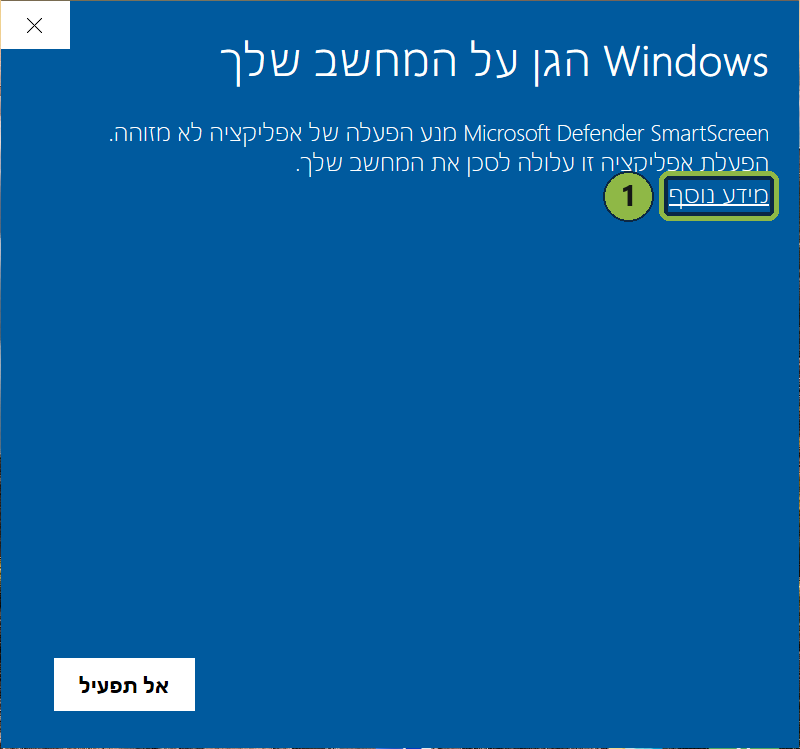
- Click Run anyway, and the installation carries on as usual.
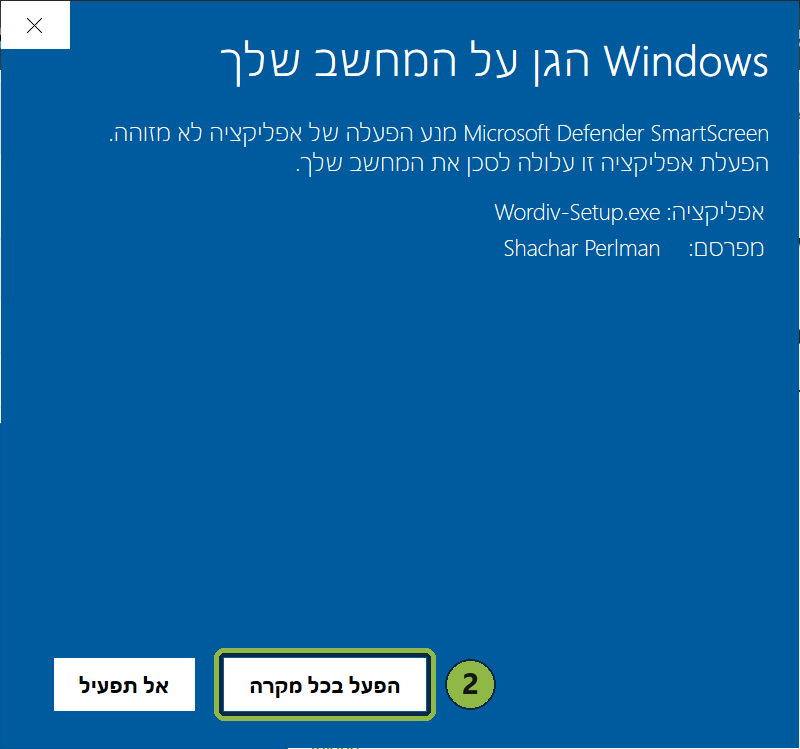
How to check it is really our file: after you click "More info", a Publisher line appears - it should say Shachar Perlman.
Ready? Download Wordiv
Tick the box to download
Download Wordivברוכים הבאים לבטא של Wordiv
שלושה צעדים, כמה דקות, ואתם בפנים.
- מורידים ומתקינים. כפתור ההורדה נמצא בתחתית העמוד, אחרי ההסברים.
אם Windows מציג מסך כחול "Windows הגן על המחשב שלך" - לוחצים מידע נוסף ואז הפעל בכל מקרה. זה קורה לכל תוכנה חדשה - ההסבר המלא, עם תמונות.
- עוברים על כרטיסי ההיכרות. בהפעלה הראשונה נפתחים שישה כרטיסים קצרים: הכתבה ותרגום, הלשונית הצדדית, ה-"?" שליד כל כלי, והכלים על טקסט מסומן. אפשר לחזור אליהם אחר כך מהלשונית הצדדית.
- מתחברים עם Google. בכרטיס האחרון לוחצים "התחברות עם Google", בוחרים חשבון בדפדפן שנפתח, וחוזרים ל-Wordiv. זהו - מחזיקים Win+Ctrl ומדברים.
רוצים לראות לפני?
יש סקירה של 15 דקות שמראה את כל היכולות על מסך אמיתי. ובתוך התוכנה, ה-"?" שליד כל כלי מסביר אותו.
כדאי לדעת
- בודקי בטא (מספר המקומות מוגבל) מקבלים 30 יום של גישה מלאה, ואז עוברים אוטומטית למסלול החינמי. לכל חשבון יש מכסת שימוש חודשית. כמה ממנה נוצל רואים בהגדרות, והיא מתחדשת בתחילת כל חודש.
- מחשב מתחבר לחשבון Google אחד בלבד, ונשאר מחובר אליו. אפשר להשתמש באותו חשבון בעד שני מחשבים.
- נדרש חיבור לאינטרנט.
- איך משתמשים בכל יכולת: לוחצים על הלשונית שבצד המסך, וליד כל פעולה יש "?" עם הסבר. תשובות לשאלות נפוצות כאן.
מה אנחנו רוצים ללמוד
לא "אהבתי" - מה השתנה ביום שלכם:
- איזו פעולה התחלתם לעשות עם Wordiv במקום בדרך הישנה
- איפה היא טעתה, או משהו היה לא ברור
- מה עדיין מחזיר אתכם למקלדת או לכלי אחר
נפנה אליכם פעם או פעמיים כדי לשמוע מה דעתכם. זו כל המטרה - ספרו לנו מה אפשר לשפר.
צפוי להופיע מסך כחול של Windows - זה בסדר
בפעם הראשונה שתריצו את קובץ ההתקנה, Windows יציג מסך כחול שאומר "Windows הגן על המחשב שלך". זה קורה לכל תוכנה חדשה בתקופת הבטא, עד ש-Windows לומד לזהות אותה - וזה לא אומר שמשהו לא תקין בתוכנה.
Windows סופר כמה אנשים בעולם כבר הורידו קובץ מסוים, ועד שהמספר הזה גדל מספיק הוא מציג את המסך הזה לכל תוכנה חדשה. ככל שיותר אנשים יתקינו, המסך הזה ייעלם מעצמו.
אז כשהמסך הזה מופיע, שני צעדים:
- לוחצים על מידע נוסף.
- לוחצים על הפעל בכל מקרה, וההתקנה ממשיכה כרגיל.
איך יודעים שזה באמת הקובץ שלנו: אחרי הלחיצה על "מידע נוסף" מופיעה שורת מפרסם - השם בה צריך להיות Shachar Perlman.
מוכנים? מורידים את Wordiv
סמנו את התיבה כדי להוריד
הורדת WordivTalk to us
A question, an idea, something that does not work? We would love to hear. The fastest way to reach us is WhatsApp.
- Phone / WhatsApp: 050-5662727
- Email: info@wordiv.app
Or leave us a message here
דברו איתנו
שאלה, רעיון, משהו שלא עובד? נשמח לשמוע. הדרך המהירה ביותר להגיע אלינו היא וואטסאפ.
- טלפון / וואטסאפ: 050-5662727
- אימייל: info@wordiv.app
או השאירו לנו הודעה כאן
The beta is full
Leave your email and we'll let you know the moment the full version of Wordiv launches.
המקומות בבטא נגמרו
השאירו מייל, ונודיע לכם ברגע שהגרסה המלאה של Wordiv עולה לאוויר.
Start free
A limited number of places are open for beta testers at this stage. Every beta tester gets 30 days of full access, then continues on the Free plan. The paid plans are coming soon.
- Limited beta places
- No credit card
- Local tools - unlimited
Plan comparison
-
Free
Available nowTo get started - every local tool, with modest allowances.
Free- Local toolsUnlimitedKeyboard-layout fix, text direction, word count, text shortcuts and history
- Dictation2,500 words a weekRegular dictation, translation as you speak (Windows+Alt), and dictating change requests in the writing windows
- Translation and rewriting10 a monthTranslating selected text, better wording and the writing assistant, prompt improvement and agent prompts
- Voice assistant5 a monthQuestions to the assistant, about selected text, files or an area of the screen
- Screen text capture20 a monthCopying text from anywhere on the screen, and image analysis
- RecordingsOne, up to 30 minutes, a monthTranscribing audio and video files
- Questions about YouTube videosNot included
- Personal writing stylesNot included
-
Basic
Coming soonFor everyday use - hours of dictation, and recordings with speaker separation.
Price coming soon- Local toolsUnlimitedKeyboard-layout fix, text direction, word count, text shortcuts and history
- Dictation12 hours a monthRegular dictation, translation as you speak (Windows+Alt), and dictating change requests in the writing windows
- Translation and rewriting80 a monthTranslating selected text, better wording and the writing assistant, prompt improvement and agent prompts
- Voice assistant25 a monthQuestions to the assistant, about selected text, files or an area of the screen
- Screen text captureUnlimitedCopying text from anywhere on the screen, and image analysis
- Recordings3 hours a monthwith speaker separationTranscribing audio and video files
- Questions about YouTube videos1 hour a month
- Personal writing styles1
-
Pro
Coming soonFor heavy use - higher allowances across every tool.
Price coming soon- Local toolsUnlimitedKeyboard-layout fix, text direction, word count, text shortcuts and history
- Dictation15 hours a monthRegular dictation, translation as you speak (Windows+Alt), and dictating change requests in the writing windows
- Translation and rewriting300 a month(fair use)Translating selected text, better wording and the writing assistant, prompt improvement and agent prompts
- Voice assistant120 a monthQuestions to the assistant, about selected text, files or an area of the screen
- Screen text captureUnlimitedCopying text from anywhere on the screen, and image analysis
- Recordings8 hours a monthwith speaker separationTranscribing audio and video files
- Questions about YouTube videos3 hours a month
- Personal writing styles6
-
Lifetime -your own key
Coming soonOne purchase at a special launch price, announced soon. Wordiv then runs on your own API keys - no allowances.
During the beta you can use your own API keys at no charge. After the beta, using your own API keys will be part of the Lifetime plan: a one-time purchase of the app, and then you work with your own keys with no allowances.
Price coming soon- Local toolsUnlimitedKeyboard-layout fix, text direction, word count, text shortcuts and history
- DictationUnlimitedRegular dictation, translation as you speak (Windows+Alt), and dictating change requests in the writing windows
- Translation and rewritingUnlimitedTranslating selected text, better wording and the writing assistant, prompt improvement and agent prompts
- Voice assistantUnlimitedQuestions to the assistant, about selected text, files or an area of the screen
- Screen text captureUnlimitedCopying text from anywhere on the screen, and image analysis
- RecordingsUnlimitedTranscribing audio and video files
- Questions about YouTube videosUnlimited
- Personal writing styles6
- The local tools work on every plan, even offline.
- A change request in a writing window ("Ask for a change") does not come out of your translation and rewriting allowance - it counts as dictation words.
What you get during the beta
Beta testers get 30 days of access to everything Wordiv can do, including what is in the paid plans - speaker separation, questions about YouTube videos and personal writing styles - with a generous monthly usage allowance. When the period ends, the account moves automatically to the Free plan, with no lockout and no credit card. The number of beta places is limited; when they fill up, you can join the waiting list.
The paid plans are coming soon
Leave your email and we'll let you know when the paid plans are available.
מתחילים בחינם
בשלב הזה פתוח מספר מוגבל של מקומות לבודקי בטא. כל בודק בטא מקבל 30 יום של גישה מלאה, ואחר כך ממשיך במסלול החינמי. המסלולים בתשלום יגיעו בקרוב.
- מספר מקומות מוגבל בבטא
- בלי כרטיס אשראי
- הכלים המקומיים - ללא הגבלה
השוואת המסלולים
-
חינמי
זמין עכשיולהתחלה - כל הכלים המקומיים, עם מכסות שימוש צנועות.
חינם- כלים מקומייםללא הגבלהתיקון שפת מקלדת, כיוון טקסט, ספירת מילים, קיצורי טקסט והיסטוריה
- הכתבה2,500 מילים בשבועהכתבה רגילה, תרגום תוך כדי דיבור (Windows+Alt), והקלטת בקשות שינוי בחלונות הכתיבה
- תרגום ושכתוב10 בחודשתרגום טקסט מסומן, שיפור ניסוח ועוזר כתיבה, שיפור פרומפט ופרומפט לסוכן
- עוזר קולי5 בחודששאלות לעוזר, על טקסט מסומן, קבצים או אזור במסך
- צילום טקסט מהמסך20 בחודשהעתקת טקסט מכל מקום במסך, וניתוח תמונות
- הקלטותאחת, עד 30 דקות בחודשתמלול קבצי שמע ווידאו
- שאלות על YouTubeלא כלול
- סגנונות כתיבה אישייםלא כלול
-
בסיסי
בקרובלשימוש יומיומי - שעות של הכתבה, והקלטות עם הפרדת דוברים.
המחיר יפורסם בקרוב- כלים מקומייםללא הגבלהתיקון שפת מקלדת, כיוון טקסט, ספירת מילים, קיצורי טקסט והיסטוריה
- הכתבה12 שעות בחודשהכתבה רגילה, תרגום תוך כדי דיבור (Windows+Alt), והקלטת בקשות שינוי בחלונות הכתיבה
- תרגום ושכתוב80 בחודשתרגום טקסט מסומן, שיפור ניסוח ועוזר כתיבה, שיפור פרומפט ופרומפט לסוכן
- עוזר קולי25 בחודששאלות לעוזר, על טקסט מסומן, קבצים או אזור במסך
- צילום טקסט מהמסךללא הגבלההעתקת טקסט מכל מקום במסך, וניתוח תמונות
- הקלטות3 שעות בחודשעם הפרדת דובריםתמלול קבצי שמע ווידאו
- שאלות על YouTubeשעה בחודש
- סגנונות כתיבה אישיים1
-
פרו
בקרובלעבודה אינטנסיבית - מכסות גבוהות בכל הכלים.
המחיר יפורסם בקרוב- כלים מקומייםללא הגבלהתיקון שפת מקלדת, כיוון טקסט, ספירת מילים, קיצורי טקסט והיסטוריה
- הכתבה15 שעות בחודשהכתבה רגילה, תרגום תוך כדי דיבור (Windows+Alt), והקלטת בקשות שינוי בחלונות הכתיבה
- תרגום ושכתוב300 בחודש(שימוש הוגן)תרגום טקסט מסומן, שיפור ניסוח ועוזר כתיבה, שיפור פרומפט ופרומפט לסוכן
- עוזר קולי120 בחודששאלות לעוזר, על טקסט מסומן, קבצים או אזור במסך
- צילום טקסט מהמסךללא הגבלההעתקת טקסט מכל מקום במסך, וניתוח תמונות
- הקלטות8 שעות בחודשעם הפרדת דובריםתמלול קבצי שמע ווידאו
- שאלות על YouTube3 שעות בחודש
- סגנונות כתיבה אישיים6
-
לכל החיים -מפתח משלך
בקרוברכישה אחת במחיר השקה מיוחד - המחיר יפורסם בקרוב. Wordiv עובדת עם מפתחות ה-API שלכם, בלי מכסות.
בתקופת הבטא אפשר לעבוד עם מפתחות API משלכם בלי תשלום. אחרי הבטא, העבודה עם מפתחות API משלכם תהיה חלק ממסלול "לכל החיים": רכישה חד-פעמית של התוכנה, ואז עובדים עם המפתחות שלכם בלי מכסות.
המחיר יפורסם בקרוב- כלים מקומייםללא הגבלהתיקון שפת מקלדת, כיוון טקסט, ספירת מילים, קיצורי טקסט והיסטוריה
- הכתבהללא הגבלההכתבה רגילה, תרגום תוך כדי דיבור (Windows+Alt), והקלטת בקשות שינוי בחלונות הכתיבה
- תרגום ושכתובללא הגבלהתרגום טקסט מסומן, שיפור ניסוח ועוזר כתיבה, שיפור פרומפט ופרומפט לסוכן
- עוזר קוליללא הגבלהשאלות לעוזר, על טקסט מסומן, קבצים או אזור במסך
- צילום טקסט מהמסךללא הגבלההעתקת טקסט מכל מקום במסך, וניתוח תמונות
- הקלטותללא הגבלהתמלול קבצי שמע ווידאו
- שאלות על YouTubeללא הגבלה
- סגנונות כתיבה אישיים6
- הכלים המקומיים עובדים בכל מסלול, גם בלי חיבור.
- בקשת שינוי בחלון הכתיבה ("בקשו שינוי") לא יורדת ממכסת התרגום והשכתוב - היא נספרת כמילים בהכתבה.
מה מקבלים בתקופת הבטא
בודקי הבטא מקבלים 30 יום של גישה לכל היכולות של Wordiv, גם לאלה שבמסלולים בתשלום - הפרדת דוברים, שאלות על סרטוני YouTube וסגנונות כתיבה אישיים - עם מכסת שימוש חודשית נדיבה. בסוף התקופה החשבון עובר אוטומטית למסלול החינמי, בלי חסימה ובלי כרטיס אשראי. מספר המקומות בבטא מוגבל, וכשהם מתמלאים אפשר להצטרף לרשימת ההמתנה.
המסלולים בתשלום - בקרוב
השאירו מייל, ונודיע לכם כשהמסלולים בתשלום יהיו זמינים.